


Release Overview
Release Highlights
SLES 16 Support
orcharhino 7.6 now supports SUSE Linux Enterprise Server 16 Hosts on all supported architectures (x86_64, arm64, PPC)
Restructured oVirt/OLVM Support
orcharhino 7.6 keeps oVirt and Oracle Linux Virtualization Manager (OLVM) running. Moving support to a separate plugin makes it easier to maintain and support, helping customers to run or setup environments like OLVM. If you have already enabled the compute resource oVirt, orcharhino 7.6 will automatically migrate to the new plugin Provisioning virtual machines on oVirt – orcharhino documentation
Puppet to OpenVox-Migration
To ensure continued stability and support, we are migrating orcharhino Server instances from OpenSource Puppet to the fork OpenVox 8. This transition is necessary as OpenSource Puppet has reached its End-of-Life.
New installations will now default to use OpenVox 8 instead of OpenSource Puppet. Existing installation can be switched to OpenVox 8 following the documentation: Upgrading orcharhino Server – orcharhino documentation.
In addition to the switch to OpenVox 8 orcharhino gives full flexibility by supporting other versions like Puppet Core 8 or Puppet Enterprise via orcharhino proxies.
Alternate Content Sources for Debian and Ubuntu
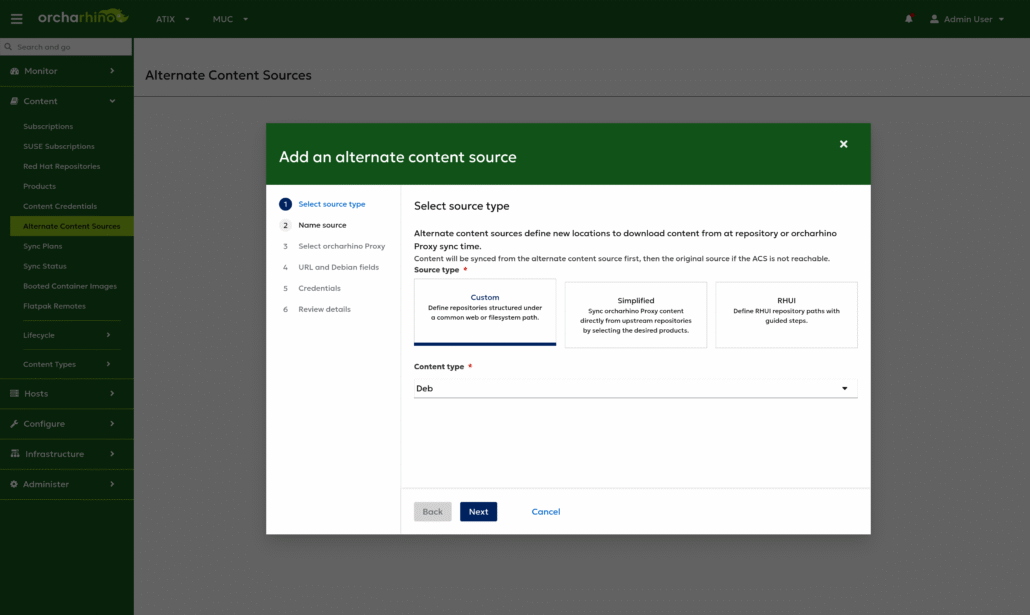
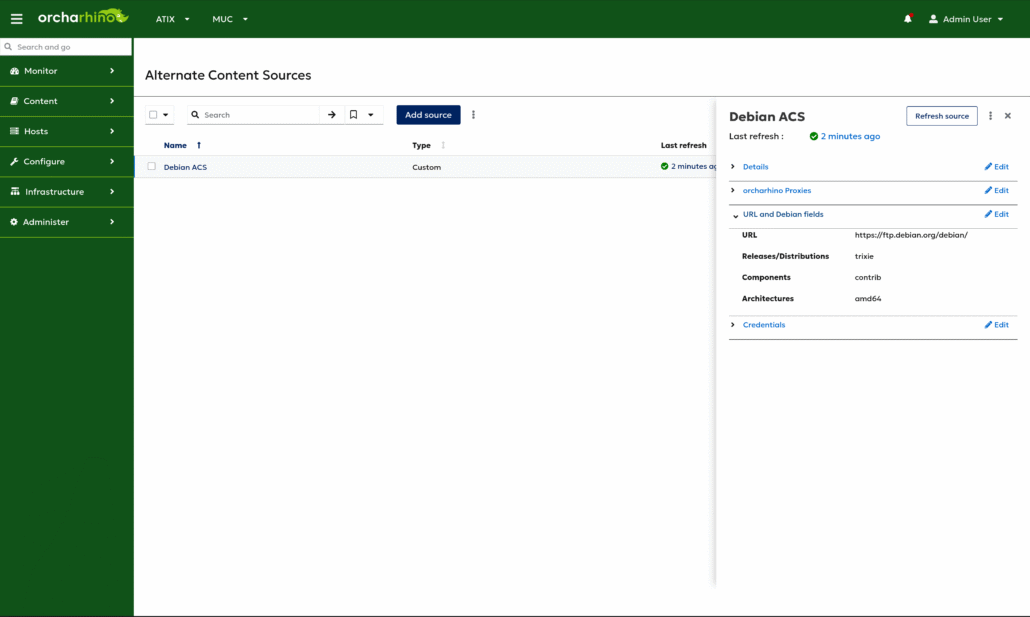
With orcharhino 7.6 Alternate Content Sources are now also available for Ubuntu und Debian, in addition to Yum and File type content. This can increase the resilience of a regional distributed setup and making better use of available bandwidth. Setting up multiple sources allow use of backup sources and place them regional closer, avoiding long distance lines to overload. For more information: Managing alternate content sources

New Flatpak UI
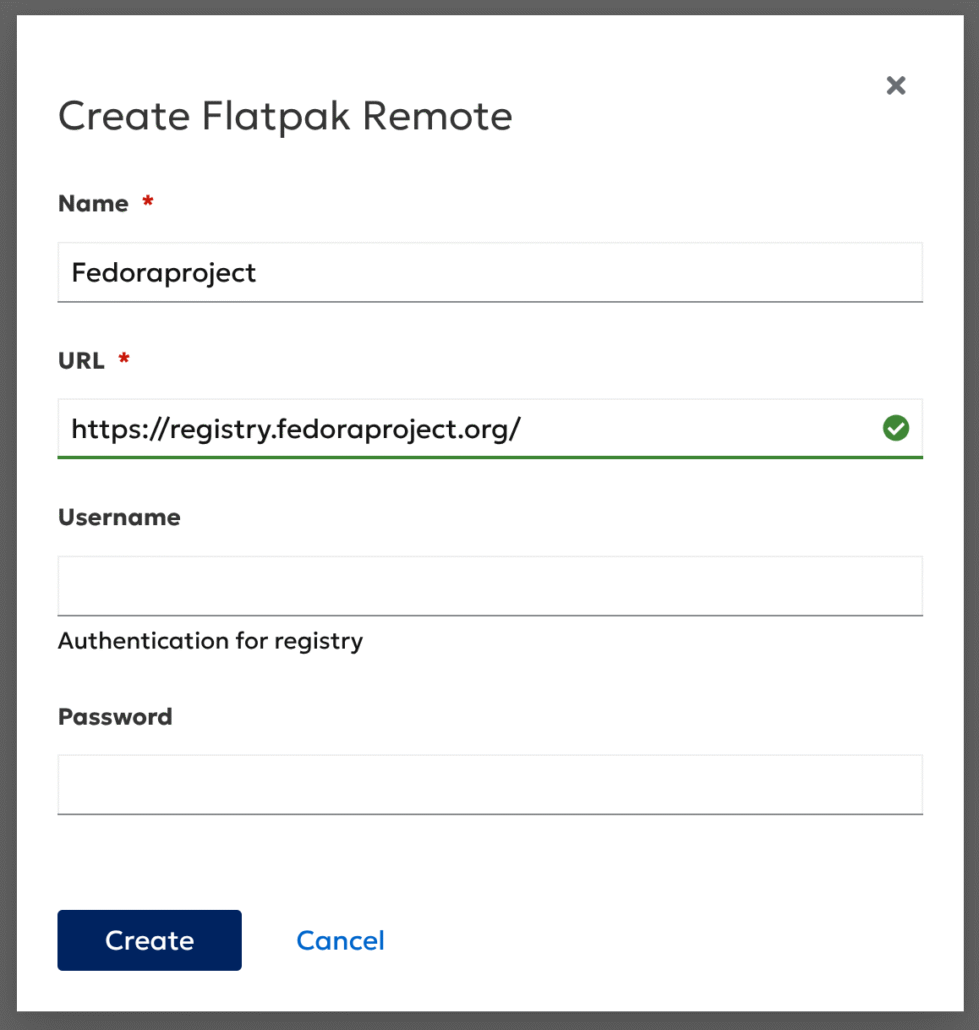
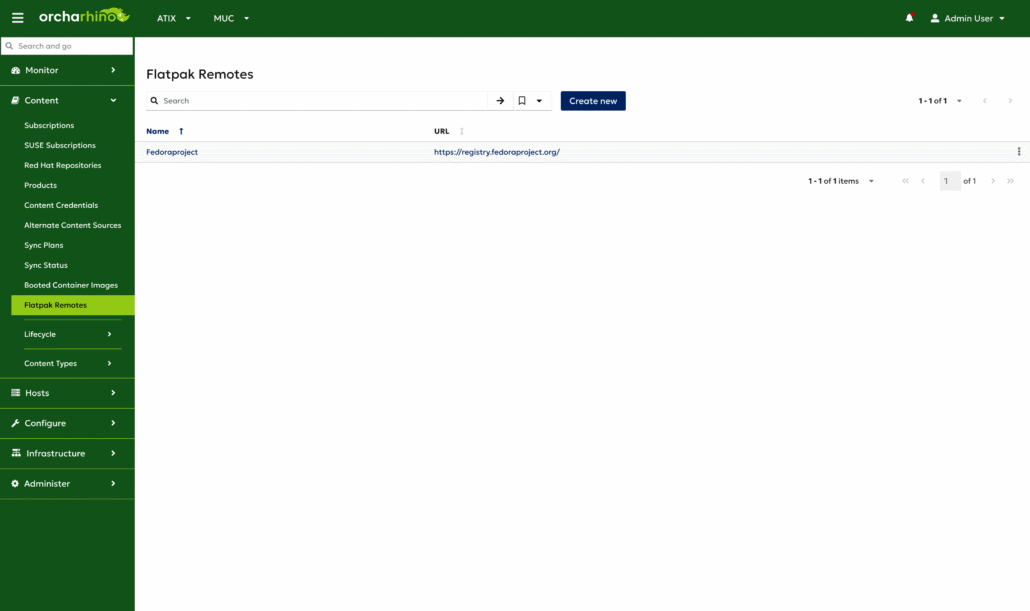
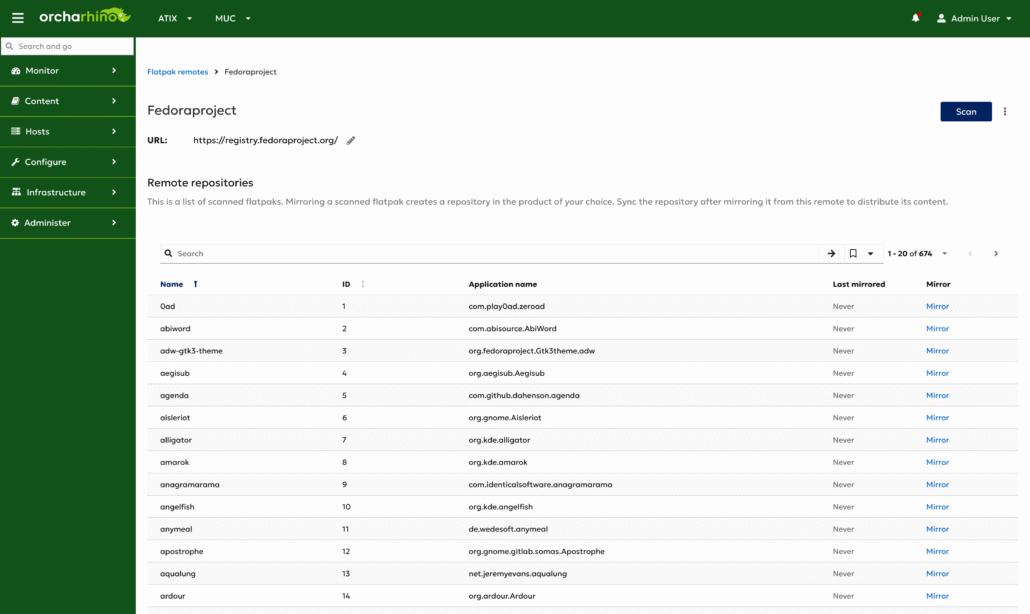
orcharhino 7.6 provides a more accessible way to manage Flatpak content by adding a graphical user interface. Users can now create, edit, and scan Flatpak remotes, as well as mirror Flatpak repositories through intuitive visual workflows. This significantly reduces reliance on CLI tools and streamlines the Flatpak content management experience across the organization.
Deprecations
- Application Centric Deployment: The Application Centric Deployment (ACD) plugin is not supported anymore. Use the script ‚/opt/orcharhino/plugin_uninstaller/uninstall_foreman_acd.sh‘ to remove the plugin.
- orcharhino Clients: Moved to gen3 orcharhino Clients. See knowledge base article about differences between gen2 and gen3 and how to upgrade clients. With the release of gen3 clients, the development of gen2 clients is discontinued and customers should update their clients repositories to use gen3 client to receive updates to ensure compatibility with new features. https://atixservice.zendesk.com/hc/de/articles/23846651659036
- Proxmox: orcharhino 7.6 supports Proxmox 8 and Proxmox 9, support for Proxmox 7 is removed. Please upgrade your Proxmox infrastructure to Proxmox 8 or Proxmox 9.
- Puppet Support: OpenSource Puppet 7 & 8 is deprecated and will be replaced by OpenVox 8 in upcoming versions for the orcharhino Server.
Known Issues
- There is no OpenVox / Puppet agent available for SLES16 and the automatic setup during provisioning does not work currently. Therefore, the current SLES 16 agama provisioning does not include the setup instructions for OpenVox / Puppet.
- The Salt minion does currently not run in Agama / SLES16. Therefore, the automatic salt setup during host provisioning isn’t supported.
Changelog Features
- Configuration Management (OpenVox 8): Add host parameters „enable-openvox8“ to documentation for host provisioning, host registration, and manual setup of OpenVox agent on hosts.
- Content Management (Debian/Ubuntu): Republish repository metadata will now update Debian and Ubuntu content URL options when needed.
- Content Management (Debian/Ubuntu): Uploading Debian packages by using the Foreman Ansible modules failed on orcharhino Server because of missing ‚python3.12-debian‘ dependency.
- Content Management (EL): You can now synchronize Yum repositories without filelists.xml or other.xml metadata.
- Content Management (Flatpak): Certificate-based authentication is now supported for container and Flatpak repositories, allowing hosts to securely consume content without relying on conventional username/password logins: https://docs.orcharhino.com/or/docs/sources/landing_page.html?page=managing_content/managing_flatpak_repositories.html#setting-up-flatpak-remote-for-orcharhino-proxy
- Content Management (Flatpak): Use orcharhino management UI or Hammer CLI to synchronize and distribute Flatpak repositories to hosts: https://docs.orcharhino.com/or/docs/sources/landing_page.html?page=managing_content/managing_flatpak_repositories.html
- Content Management: Add documentation on how to use Hammer CLI to republish metadata on orcharhino Server for synchronized repositories or published content views: https://docs.orcharhino.com/or/docs/sources/landing_page.html?page=managing_content/importing_content.html#republishing-repository-metadata-by-using-cli
- Dual-Stack IPv4/IPv6 Registration Support: Comprehensive client registration in dual-stack environments, ensuring seamless operation over both IPv4 and IPv6 networks.
- Host Deployment (SLES 16): Added provisioning templates and partition tables for Agama installer which is used starting with SLES 16. For changes in management starting with SLES 16, see https://www.suse.com/c/systems-management-with-suse-linux-enterprise-server-16/
- Host Provisioning (Oracle Linux): Reworked procedure to create installation medium by extracting an ISO image to provision hosts in disconnected environments: https://docs.orcharhino.com/or/docs/sources/guides/oracle_linux/provisioning_hosts/preparing_provisioning_content.html#creating-an-installation-medium-for-oracle-linux
- Host Provisioning (Ubuntu): If you provision Ubuntu hosts using the „Preseed Autoinstall cloud-init user data“ template, you can overwrite the content source with the „ubuntu_mirror_uri“ parameter: https://docs.orcharhino.com/or/docs/sources/guides/ubuntu/provisioning_hosts/preparing_provisioning_content.html#Provisioning_Ubuntu_Autoinstall_Through_Smart_Proxies_provisioning
- Host Registration: Add required SUSE content to register hosts running SUSE Linux Enterprise Server 16 to orcharhino: https://docs.orcharhino.com/or/docs/sources/guides/suse_linux_enterprise_server/managing_hosts/registering_hosts.html#registering-a-host_managing-hosts
- IoP (Tech Preview): You can use IoP on your orcharhino Server to perform health checks and apply suggestions to hosts: https://docs.orcharhino.com/or/docs/sources/installation_and_maintenance/installing_orcharhino_server.html#installing-and-configuring-insights-in-orcharhino
- libvirt: The VNC password attribute was set incorrectly.
- Management UI: The ‚Jobs‘ details page has been modernized to deliver a better look and feel, improved usability, and an overall enhanced user experience.
- Management UI: The new Flatpak UI allows users to manage Flatpak remotes and repositories directly within the orcharhino Management UI including creating, editing, and scanning remotes and mirroring repositories through easy-to-use visual workflows.
- Monitoring orcharhino: You can use Hammer CLI to view the status of orcharhino components: https://docs.orcharhino.com/or/docs/sources/guides/administering_orcharhino.html#retrieving-the-status-of-services-by-using-cli_admin
- Offline ISO Image: Run orcharhino Server in disconnected environments on EL 9.7.
- Offline ISO Image: You can install and use OpenVox in disconnected environments by using the orcharhino Offline ISO Images.
- orcharhino Clients (Debian/Ubuntu): Added package dependency for ‚python3-apt‘ to subscription-manager.
- orcharhino Clients (SLES 16): Add support for SLES 16.0. Note: No Puppet/OpenVox support is available for this release, yet.
- orcharhino Proxy Server (Windows): Update to Ruby 3.4.
- orcharhino Proxy Server: Ensure that your orcharhino Server is registered to OCC before preparing content for orcharhino Proxy Servers: https://docs.orcharhino.com/or/docs/sources/installation_and_maintenance/installing_orcharhino_proxy_server.html#Preparing_Content_for_orcharhino_Proxy
- orcharhino Proxy Server: Setting up content now automatically enables SSL verification and GPG key verification for content from OCC signed by ATIX AG.
- orcharhino Subscription Key: Added documentation to view current orcharhino Subscription details by using CLI: https://docs.orcharhino.com/or/docs/sources/installation_and_maintenance/using_orcharhino_subscription_keys.html#viewing-orcharhino-subscription-details-by-using-cli
- Proxmox: Added ‚Power off‘ bulk action for Proxmox hosts.
- Puppet/OpenVox Setup: Adapt provisioning templates to support OpenVox.
- SCC Manager: The ‚SUSE Customer Center account‘ page has a new, modern design and was restructured for a better overview: https://docs.orcharhino.com/or/docs/sources/guides/suse_linux_enterprise_server/managing_content/managing_suse_content.html#adding-an-scc-account-to-orcharhino-by-using-web-ui
- SCC Manager: The ‚SUSE subscriptions‘ overview page has been modernized and moved to the ‚React‘ framework.
Changelog CVE
- CVE-2025-10622: Validate ct_location and fcct_location.
- CVE-2025-9572: GraphQL API permission bypass leads to information disclosure.
Changelog Bugfixes
- Ansible: The Ansible ‚json_query‘ filter was not working.
- Content Management (Debian/Ubuntu): Expanded the structured APT fallback mechanism to cover partially structured repository versions.
- Content Management (Oracle Linux): Upgrading the subscription-manager to version 1.30.10 for Oracle 10.
- Content Management: The availability of component content view updates was displayed incorrectly.
- Content Management: Uploading RPM packages using the Ansible collection role failed.
- Host Provisioning (SLES 12SP5): Registration over HTTPS with self-signed certificates failed due to a bug in a provisioning snippet.
- Management UI: Searching for packages on a Debian/Ubuntu host resulted in a 500 server error.
- oVirt/OLVM: The NIC adapter details were not displayed.
- Proxmox: Image creation did not work if any storage in Proxmox server was disabled.
- SCC Manager: ‚download policy‘ and ‚mirroring policy‘ were not changeable via API.