


Release Overview
Release Highlights
Proxmox Performance Boost + New EFI Disk Support
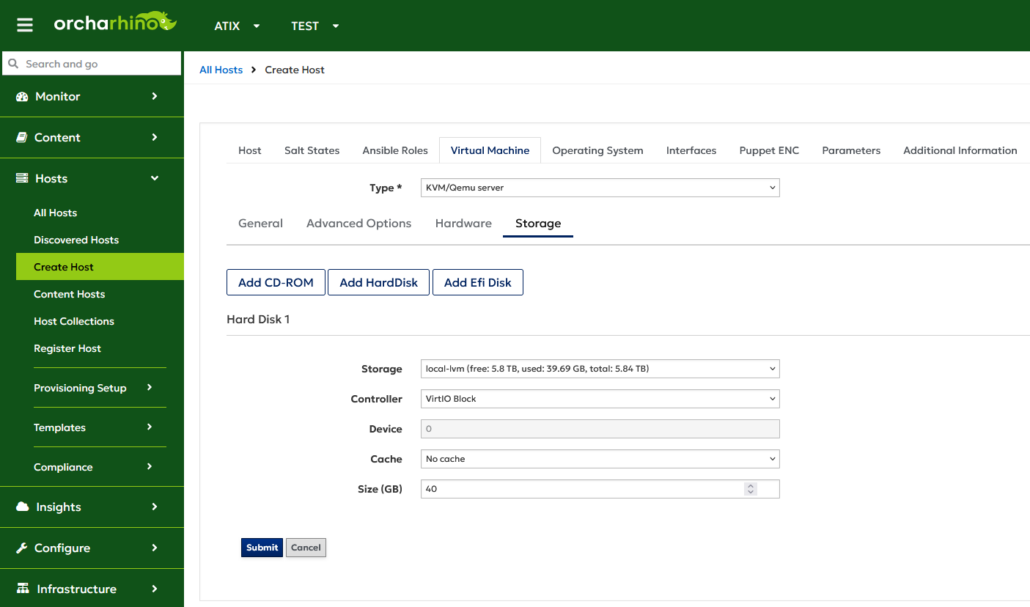
This release brings significant improvements to the Proxmox compute resource plugin. You can now create EFI disks for KVM UEFI guests and benefit from enhanced handling of Proxmox HA resources. We have also optimized data retrieval from Proxmox clusters, reducing loading times by up to 80% in our tests, depending on environment scale and performance.
Support for Ubuntu ESM‑Apps Errata
With orcharhino 7.7, security errata coverage has been extended to Ubuntu ESM Apps repositories. This provides visibility into security updates for applications maintained under Ubuntu’s Expanded Security Maintenance (ESM) program. Access to these repositories requires a valid Ubuntu Pro subscription.
SLES 16 Provisioning: Extended Template Support for SLES 16 + Agama
With this release, orcharhino takes another step forward in simplifying and automating SLES 16 deployments. Building on the new Agama installer, we’ve enhanced our provisioning templates to support key enterprise features:
- Seamless static network interface configuration for environments without DHCP service
- Automated setup and configuration of OpenVox/Puppet agents (as soon as puppet packages become available)
- Automated setup and configuration of Salt minions
Patch Management for Image Mode Hosts (bootc)
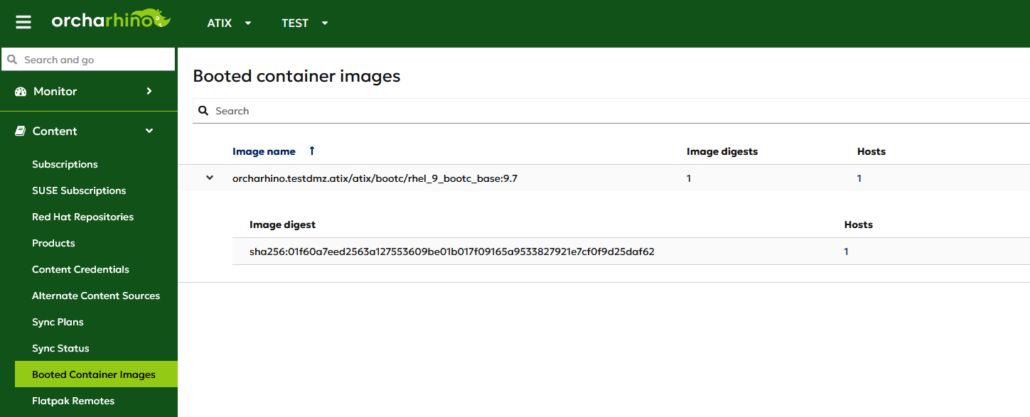
Image mode hosts are systems that use bootc (bootable containers), where the entire operating system is packaged and managed as OCI container images. This immutable infrastructure-approach provides a stable and secure operating system by ensuring consistency across deployments and enabling transactional updates with built‑in rollback capabilities.
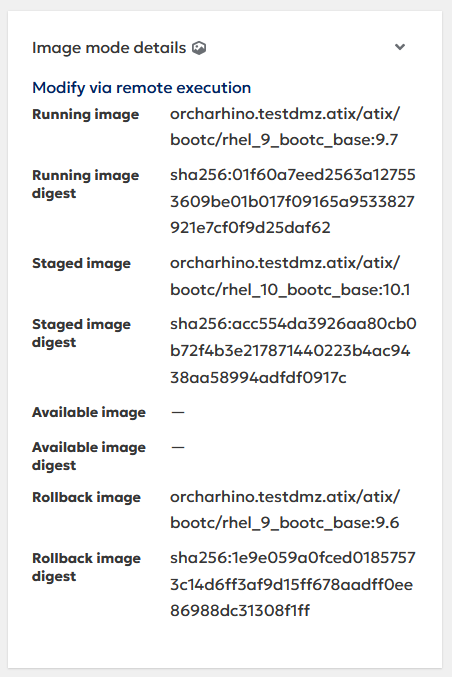
With this release, orcharhino extends its support for image mode hosts based on bootc. In addition to host registration, you can now use remote execution jobs to:
- stage the switch to new container images,
- update existing images,
- and roll back to a previous image.
These images can be stored in any container registry – including the built‑in container registry provided by orcharhino.
A new feature, transient package installation also enables temporary installation or update of packages on a running system. Because these changes are transient, they are discarded on the next reboot. This is useful for quick fixes, testing, or applying urgent errata. Permanent fixes can then be incorporated into new images, which you can stage for adoption during the next reboot cycle.
Deprecations
- Application Centric Deployment: The ACD plugin is not supported anymore.
Tech Previews
- New All Hosts Page (Tech Preview): The kebab menu did not close by clicking anywhere on the screen.
- New All Hosts page (Tech Preview): You can now create snapshots as bulk action on the new All Hosts page.
Changelog Features
- orcharhino Clients: Accelerate routine to configure new operating systems in orcharhino through automation script. See Creating operating systems by using orcharhino management UI.
- Documentation: Split documentation to by UI: You can now easier find the relevant documentation for either using orcharhino management UI or using Hammer CLI:
- Managing Content: Importing content, managing application lifecycles, managing content views
- Provisioning Hosts: Complete guide to provision hosts
- Managing Hosts: Configuring host collections
- Administering orcharhino: Complete guide to administer orcharhino
- Managing orcharhino: Complete guide to manage organizations and locations
- Managing Content: Extended guide to manage content access control for hosts
- Configuration Management (Salt): Added an option to configure the Salt minimum auth version in orcharhino-installer to support older versions of Salt minions.
- Content Management (Debian): Updated list of required GPG key pairs to verify „Release“ files from Debian default OS repositories using „gpg“: https://docs.orcharhino.com/or/docs/sources/guides/debian/managing_content/importing_content.html#GPG_Keys_for_Debian
- Host Deploment (SLES 16): Hosts can now be deployed with OpenVox/Puppet configuration management.
- Host Deployment (SLES 16): Enable deployments with static IP address. Added support to configure VLAN, bridge and bond interfaces.
- Host Deployment (SLES 16): Hosts can now be deployed with Salt configuration management.
- Proxmox: Improve the performance of page load for Proxmox VM tab.
- Proxmox: Improved handling of HA resources to allow host deletion.
- Proxmox: It is now possible to create EFI disks on Proxmox KVM UEFI.
- Request Forwarder Plugin: If you use the Request Forwarder plugin on any of your orcharhino Proxy Servers, ensure that the configuration in „/etc/foreman-proxy/settings.d/request_forwarder.yml“ is set to „https“. See https://docs.orcharhino.com/or/docs/sources/guides/puppet.html#enabling-the-request-forwarder-plugin
Changelog Bugfixes
- Configuration Management (Puppet): Puppet plugin uninstallation process did not remove the plugin completely which caused recurring warnings in log files: https://docs.orcharhino.com/or/docs/sources/guides/puppet.html#Disabling_Puppet_Integration_managing-configurations-puppet
- Content Management (Ansible): A memory leak caused Ansible collection syncs to fail with HTTP status code 502 due to OOM killer.
- Content Management (Debian/Ubuntu): Empty repository metadata is now removed from APT repositories, when content is first added to the repository for upload and additive syncs as well. This prevents meaningless APT warnings on consuming hosts.
- Host Provisioning (SLES 15): The ’ntp-server‘ host parameter was not functional.
- Host Provisioning: Host-specific parameters were not rendered into templates during host provisioning.
- Host Provisioning: Host-specific parameters were not passed correctly during provisioning using Cloud-init deployment.
- Installation (Disconnected Environments): The shell script to setup repositories on a host to mirror content from OCC failed to change the ownership of the OSK file: https://docs.orcharhino.com/or/docs/sources/installation_and_maintenance/installing_orcharhino_server_offline.html
- orcharhino Proxy Server: Use organization label in favor of hardcoded value for repository name on orcharhino Proxy Servers: https://docs.orcharhino.com/or/docs/sources/installation_and_maintenance/upgrading_orcharhino_proxy_server.html#Performing_the_Upgrade
- Remote Execution: Enable REX on your orcharhino Proxy Servers before switching them to REX Pull Provider: https://docs.orcharhino.com/or/docs/sources/installation_and_maintenance/installing_orcharhino_proxy_server.html#configuring-pull-based-transport-for-remote-execution_orcharhino-proxy