
Release Overview
Release Highlights
One unified overview for host management
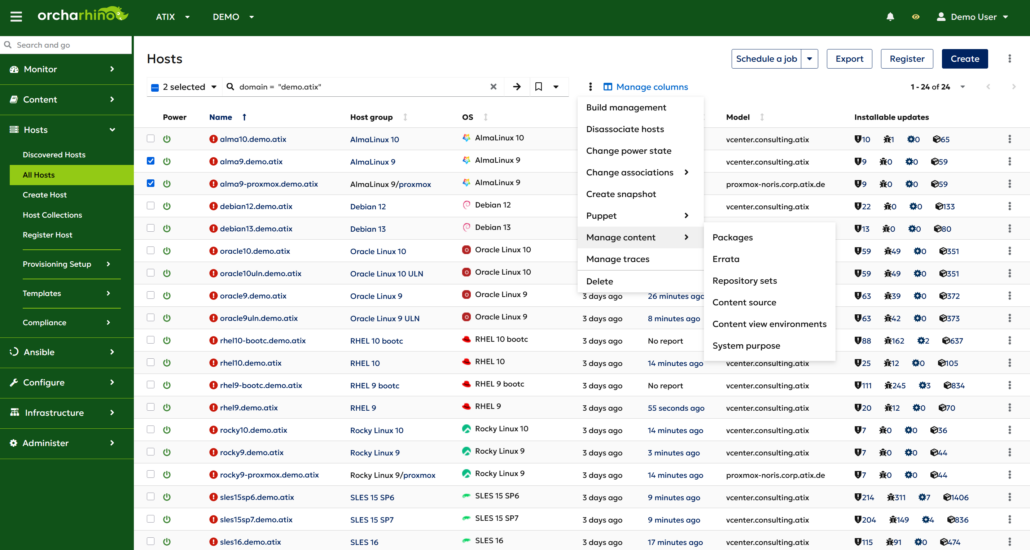
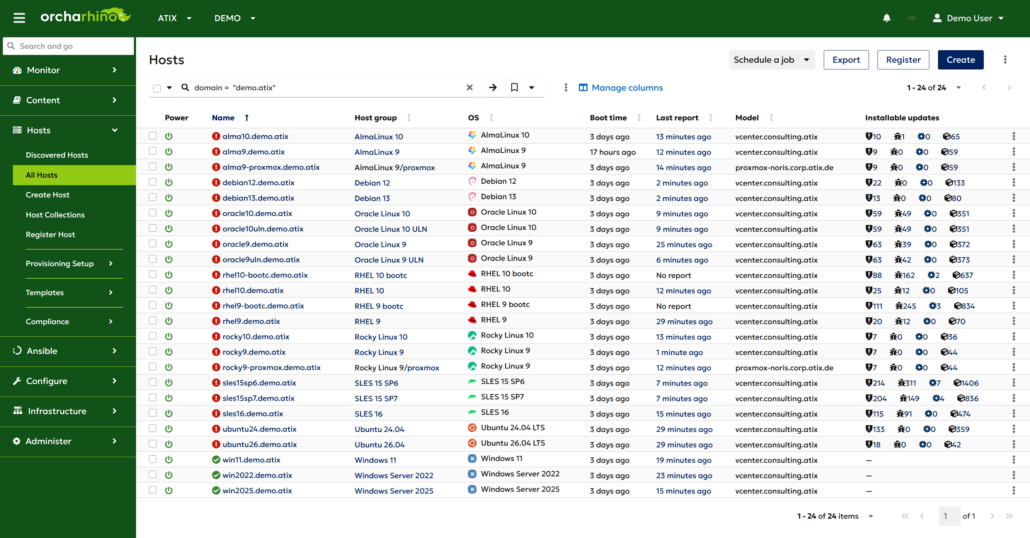
orcharhino 7.9 introduces a unified host overview that brings the former All Hosts and Content Hosts pages together in one place.
Instead of switching between two separate views, users now get a single, consistent overview for managing hosts and content-related host operations. The new page replaces All Hosts, while the separate Content Hosts page has been removed.
This gives users one clear place to work from and makes everyday host management easier. Bulk actions from both previous pages are now available in the unified overview, so existing workflows remain accessible without splitting tasks across different screens.
The redesigned page also introduces a more modern interface. For users who prefer maximum information density, compact mode can be enabled in the user profile.
Multi-Content View per Host
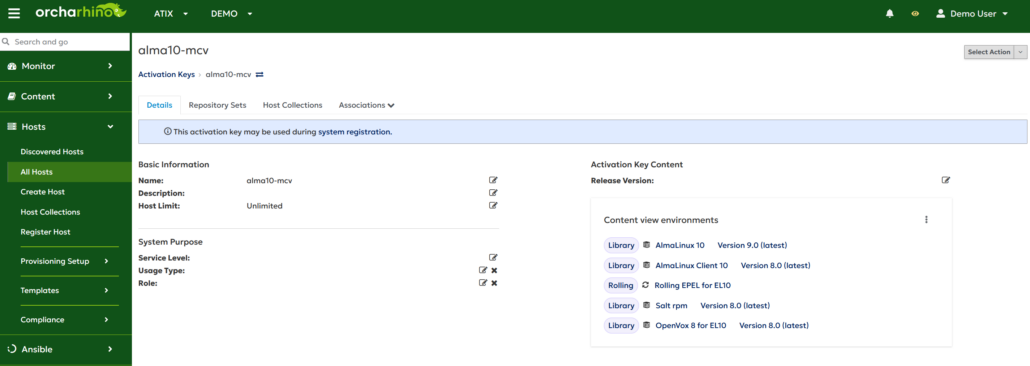
Multiple content views per host have been available as a tech preview since orcharhino 7.2, but could previously only be configured via API or Hammer. With orcharhino 7.9, this functionality is now also available directly in the UI. When the feature is enabled in the settings, activation keys and host assignments can contain more than one content view.
This enables more flexible release management models. For example, users can combine versioned content through content views with selected repositories from a rolling content view, keeping the latest synchronized content available where needed.
This feature works with the latest clients for operating systems based on EL8, SLES 15 SP4, Ubuntu 20.04, Debian 12, and newer.
Ubuntu Architecture Variants
Starting with orcharhino release 7.9, architecture variants are now supported in the synchronized content. This allows to use the new feature of the variant “amd64v3” for Ubuntu 26.04. The architecture variant provides optimized packages for supported CPUs and automatically falls back to standard amd64 packages when no optimized package is available.
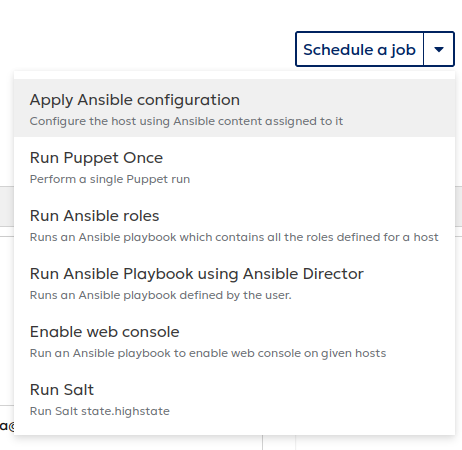
To consume architecture variant repositories, the variant must be enabled both in the repository configuration and on the host. This can be configured during provisioning or applied later using a Remote Execution job.
Separate JSON audit log
A new knowledgebase article describes how orcharhino audit events can be written to a dedicated JSON log file for external processing. Audit events shown in the UI under Monitor > Audits can now be logged in structured JSON format and separated into an audit.json file using rsyslog, while all regular log messages continue to be written to production.log.
This makes it easier to forward audit events to external systems such as SIEM, log management, or compliance tools. The structured JSON format allows administrators to search, filter, and correlate audit data automatically, supporting more efficient compliance reporting.
Tech Preview: Ansible Director
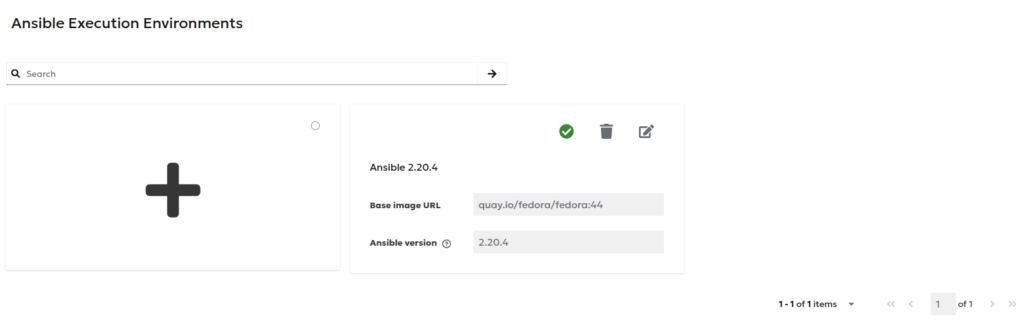
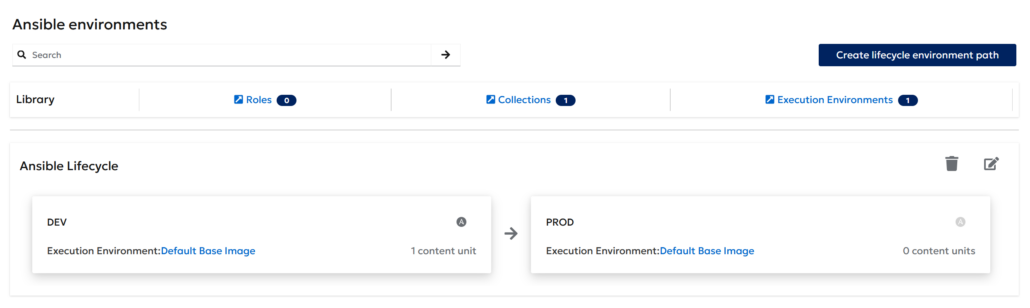
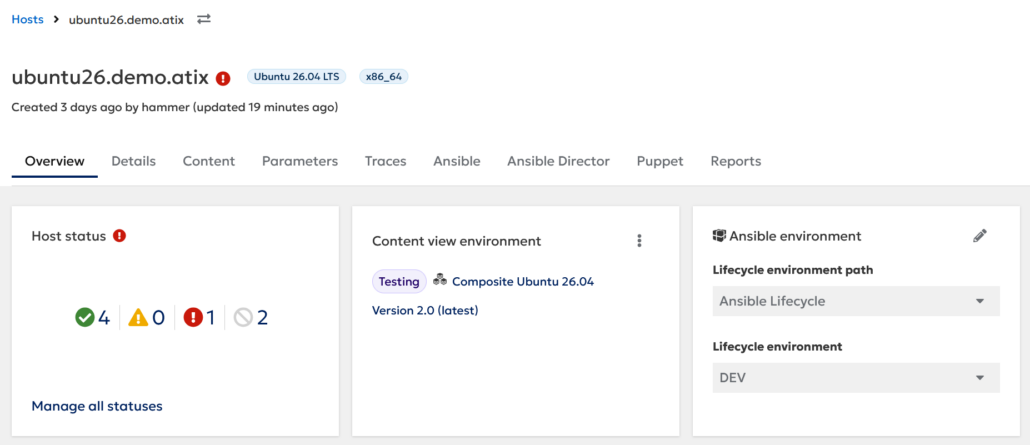
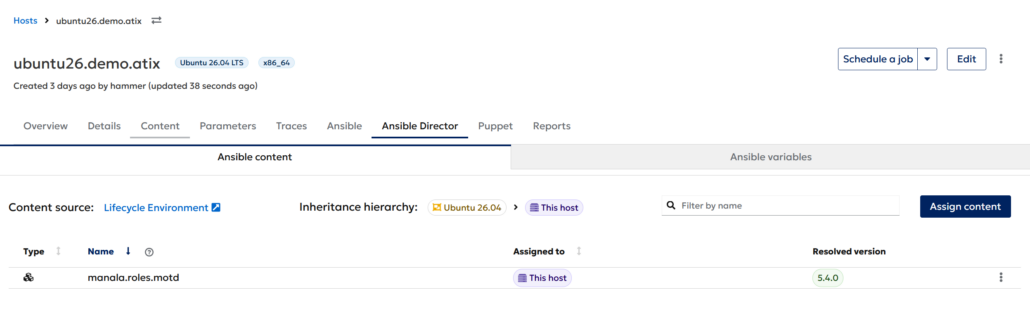
orcharhino 7.9 introduces the new Ansible Director plugin, improving how Ansible content is run and managed on hosts. It supports both Ansible roles and collections and allows content to be managed through lifecycles and assigned to environments. This plugin is available as a Technology Preview.
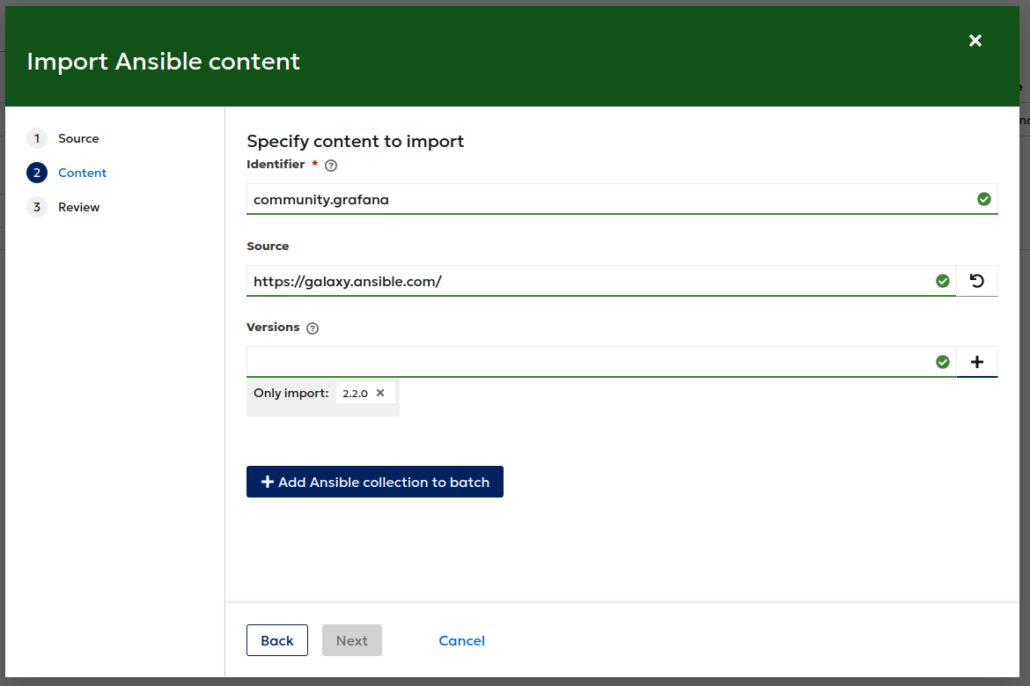
Ansible content can be imported directly from Git repositories and Ansible Galaxy, and managed through the orcharhino management UI. This simplifies the maintenance and promotion of Ansible content.
To avoid dependencies on the Ansible and Python versions provided by the operating system, Ansible Director uses Execution Environments. These provide isolated runtime environments and allow the use of different Ansible versions.
Ansible content and execution environments are assigned to organizations, ensuring strict separation between organizations and preventing them from affecting each other’s Ansible environment.
With Ansible Director, orcharhino 7.9 provides more flexible Ansible automation, easier content management, and a more reliable way to promote configurations across stages such as development, test, and production.
Tech Previews
- Ansible Director: Introduce a new plugin for managing Ansible automation on hosts.
Deprecations
- Clients: We do not maintain orcharhino Clients for Ubuntu 16.04 Xenial anymore because they are end of life by Canonical. You can continue using those Clients on your orcharhino.
- Clients: We do not maintain orcharhino Clients for Amazon Linux 2 anymore because they are end of life by Amazon. You can continue using those Clients on your orcharhino. orcharhino continues to support hosts running Amazon Linux 2023: https://docs.orcharhino.com/or/docs/sources/guides/amazon_linux.html
- Clients: We do not maintain orcharhino Clients for Debian 11 anymore because they are end of life by Debian. You can continue using those Clients on your orcharhino.
- Hammer: The hammer-plugin foreman_ssh coming from times before remote execution is deprecated and will be removed completely in a future version.
- Host overview page bulk actions: Some bulk actions are not available any more. Details can be found in the knowledgebase.
Changelog Features
- Compute Resource (Proxmox): Added Import as managed Host and Import as unmanaged Host options to the actions dropdown.
- Compute Resource (Proxmox): Only allow admin user to attach CR-ROM image to hosts or host groups.
- Compute Resources (MS Azure, Google GCE): Reword console access to cloud instances on Microsoft Azure and Google GCE: https://docs.orcharhino.com/or/docs/sources/compute_resources.html
- Content (Debian): Improved Debian Alternate Content Source user experience by not allowing faulty creation processes.
- Content Management (Container Images): Added a new Container Images menu with ‚Synced‘ and ‚Booted‘ tabs for viewing images in the local registry and images booted by image mode hosts.
- Content Management (Container Images): Improved the list of container images using an expandable tab. This view does now display bootc, flatpak and container images including search, pagination and bookmark functionality.
- Content Management (Container Images): On Content > Container Images, you can open the options menu to view pullable paths. This helps you set up hosts to consume container images from orcharhino Server through podman or docker.
- Content Management (Flatpak): Added dependency detection and warnings for flatpak applications during repository operations and Content View publishing.
- Core Components: orcharhino is now based on Foreman 3.18, Katello 4.20 and Pulp 3.85.
- Host Management: Collect the information if the tracer package is installed for Debian hosts and show the information on the Management UI. The UI provides a remote execution job to install the tracer package, too.
- Host Management: Possibility to authenticate with SSH certificates for remote execution between orcharhino Proxy and hosts.
- Host Provisioning (CloudInit): The root password of the host can now be set using the ‚CloudInit default‘ template.
- Host Provisioning (SUSE Linux Enterprise Server): Clarified required provisioning templates: SLES 16 uses Agama, SLES 15 and SLES 12 use AutoYaST templates: https://docs.orcharhino.com/or/docs/sources/guides/suse_linux_enterprise_server/provisioning_hosts/using_network_boot_to_provision_hosts.html#Booting_Virtual_Machines_using-network-boot
- Host Provisioning (SUSE Linux Enterprise Server): Adapted SLES 16 client so that it can be used in SUSE Linux Micro 6.2.
- Host Provisioning: A log message is written when an unattended host provisioning attempt is blocked because the host is not in build mode.
- Host Provisioning: All grub 1 provisioning templates were removed. Please use Grub2 templates instead.
- Host Provisioning: Clarified template usage for Registration and Lightspeed / Insights registration for Red Hat Enterprise Linux in KB article: https://atixservice.zendesk.com/hc/en-001/articles/28206719777564
- Host Provisioning: Removed installation of package ‚lsb-release‘ as it is unmaintained and was removed from OS repositories.
- Maintenance: Added a knowledge base article how to split the audit logs in a separate log files. See https://atixservice.zendesk.com/hc/en-001/articles/27876270775964
- Maintenance: orcharhino-maintain report can be used to collect and print usage data of orcharhino. Note, orcharhino subscriptions are not yet part of it. Use „print_or_subscription“ instead.
- Management UI: Ensure to have orcharhino-specific notifications in the management UI after an orcharhino installation.
- Management UI: New „All Hosts“ page.
- Management UI: Search on Hosts > All Hosts now allows usage of „%“ characters to search for items that start with a specific part, for example, „hostgroup ~ Ubuntu%“ to search for host that are part of any host group named „Ubuntu*“.
- New All Hosts Page: It is now possible to add and remove hosts to collections via bulk action.
- New All Hosts Page: The OS logo is now shown on the new ‚All Hosts‘ page.
- New All Hosts Page: There is now a bulk action for changing and removing Puppet (CA) proxies.
- New All Hosts Page: You can now change the power state of multiple hosts using bulk actions.
- OpenSCAP scans (SUSE Linux Enterprise Server): Install „cron“ on your Clients before performing OpenSCAP scans through Ansible or Puppet: https://atixservice.zendesk.com/hc/en-001/articles/28350079561756
- OpenTofu Plugin: You can remove the OpenTofu plugin from orcharhino through a script: https://atixservice.zendesk.com/hc/en-001/articles/28413967784604
- orcharhino platform OS: orcharhino Server 7.9 and orcharhino Proxy Servers 7.9 run on AlmaLinux 9.8, Red Hat Enterprise Linux 9.8, and Rocky Linux 9.8. As of the orcharhino 7.9 QA date, there is no Oracle Linux 9.8 yet, so we cannot verify the functionality and build the orcharhino Offline ISO yet.
- Puppet: Removed usage of Puppet 7 for orcharhino Server and orcharhino Proxy Servers. Added notes about OpenVox server and OpenVox client integration with orcharhino: https://docs.orcharhino.com/or/docs/sources/installation_and_maintenance/upgrading_orcharhino_server.html#upgrading-openvox
- Salt: Document usage of older Salt Minions with orcharhino Proxies with Salt 3006.
Changelog CVE
- CVE-2026-5135: Unauthorized modification of host configurations
- CVE-2026-5142: Cross-tenant private SSH key disclosure
- CVE-2026-5136: Privilege escalation via usergroup role assignment
- CVE-2026-1961: Remote Code Execution via command injection in WebSocket proxy
- CVE-2025-9572: GraphQL API permission bypass leads to information disclosure
Changelog Bugfixes
- Host Provisioning: Added package to migrate remote execution from SSH-script based to pull provider for Amazon Linux 2023.
- Compute Resource (Proxmox): Allow editing LXC mount point options
- Compute Resource (Proxmox): Allow to change hardware configuration of a deployed host
- Compute Resource (Proxmox): Allow to clone images without additional disks
- Compute Resource (Proxmox): Fixed CD-ROM configuration persistence, update detection, permissions, and removal handling in compute profiles and hosts.
- Compute Resource (Proxmox): Fixed network interface preservation while using compute profile to create host.
- Configuration Management: A ‚PG::SequenceGeneratorLimitExceeded‘ error occurred on systems with a significant number of reports.
- Content Management (Container Images): Revoking registry token did not prevent access to registry.
- Content Management (Container): Show only content assigned to the lifecycle environment of the host.
- Content Management (Debian/Ubuntu): Empty repository metadata is now removed from APT repositories, when content is first added to the repository for upload and additive syncs as well. This prevents meaningless APT warnings on consuming hosts.
- Content Management (Errata): The ‚applicable_errata‘ API endpoint was listing installable errata instead of applicable.
- Content Management (yum): Sync of NVIDIA graphics driver for SLES16 repository broken due to duplicate NEVRAs with identical build times.
- Content Management: Composite content views could update twice due to a single incremental update of a child content view.
- Content Management: Publishing a content view with dependency solving failed because the copy parts were skipped.
- Content Management: The ‚rhsm_url‘ setting must use HTTPS protocol for certificate-based authentication.
- Content Management: The Content View Environments via API did not work.
- Host Provisioning (CloudInit): Added template „CloudInit orcharhino“ which contains code to register Debian, Ubuntu, and SLES hosts
- Host Provisioning: Upload package profile automatically after initial host provisioning for Oracle Linux 10.
- Host Registration: The host registration failed without an error message when the ‚/unattended/built‘ endpoint was unreachable.
- Maintenance (SOS report): Show correct branding information on RHEL / Oracle Linux while creating sos report.
- Mangement UI: The BIOS information were not shown on the Host Details page if the host had only facts from the subscription-manager registration.
- orcharhino Management UI: Autocomplete search on pages such as All Hosts allowed unauthorized users to query and retrieve information about resources outside their permitted scope, including content views, lifecycle environments, activation keys, and other organization-specific content. These autocomplete results did not consistently enforce RBAC restrictions, potentially exposing metadata from other organizations or otherwise inaccessible content.
- orcharhino Management UI: Login delegation logout URL failed to redirect to external auth source.
- orcharhino Offline ISO: Make import of GPG keys wait for „Enter“ key.
