
Release Overview
Release Highlights
Support for Ubuntu 26.04
With this release of orcharhino, we provide orcharhino Clients to register and manage hosts running Ubuntu 26.04. The packages provided and tested at the time of release are based on the beta version and will be updated as necessary for the final release of Ubuntu 26.04.

Bootdisk improvements
orcharhino 7.8 improves host provisioning with Bootdisks and makes the behavior consistent across supported compute resources.
One improvement affects Bootdisk provisioning on VMware. At the end of the provisioning workflow, the ISO image uploaded to VMware is now removed automatically so it does not continue to consume storage space on the VMware side.
Another improvement changes how an already provisioned host is put back into“build mode”. Because the previous behavior differed across compute resources and could fail when requests were blocked by the compute resource, a host can now only be set to build mode while it is powered off. This makes the rebuild workflow more reliable and ensures that uploading and attaching the ISO image as a boot device works consistently across supported compute resources.

Tech-Preview: OpenTofu based Compute Resource Plugin with Hetzner Cloud Support
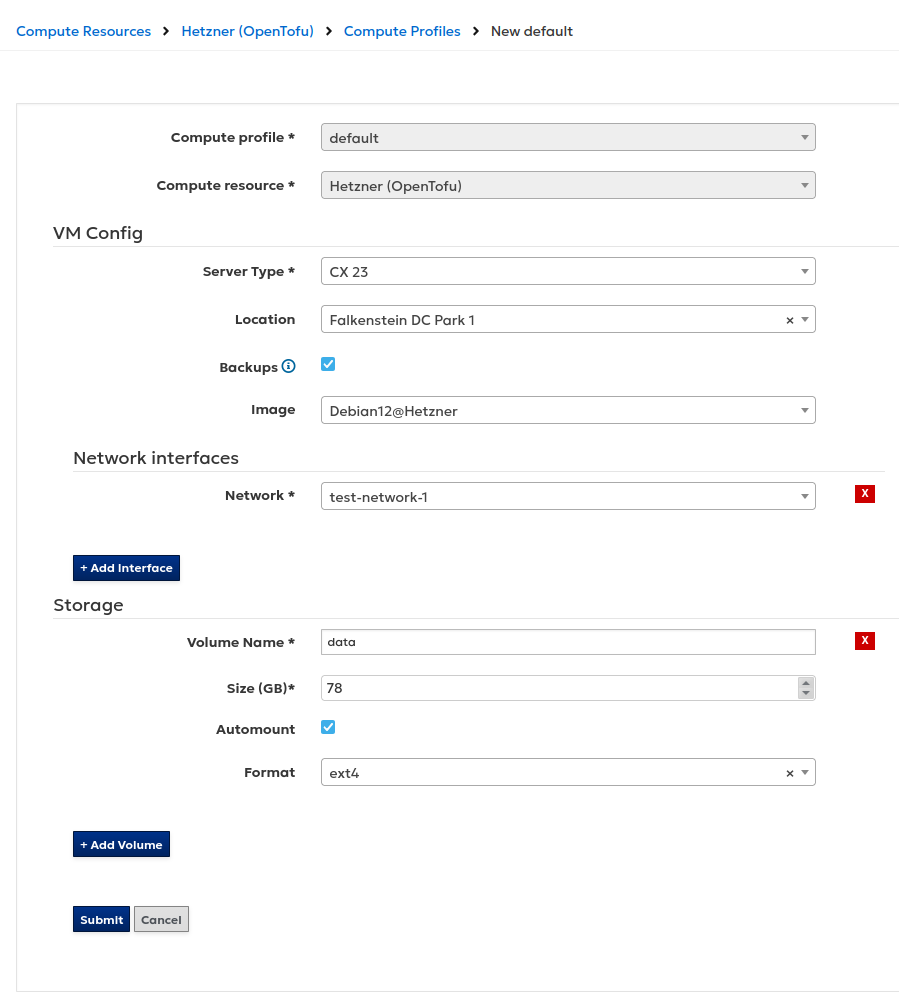
orcharhino 7.8 now includes a new generic compute resource integration based on OpenTofu (Terraform). This plugin is available as a Technology Preview.
The new approach makes it easier to add support for additional compute providers without requiring a dedicated plugin for each platform. Instead, orcharhino uses OpenTofu providers from the OpenTofu Registry to communicate with supported compute resources.
For customers, this means that support for new compute resources can be added more quickly and in a more standardized way.
With orcharhino 7.8, we deliver the OpenTofu provider for Hetzner Cloud. Future releases will deliver more providers like Nutanix.


Deprecations
- orcharhino Clients (PowerPC): We do not provide orcharhino Clients for AlmaLinux, Debian, Rocky Linux, and Ubuntu on PowerPC anymore.
- orcharhino Clients (SLES 15 SP3): We do not maintain orcharhino Clients for SUSE Linux Enterprise Server 15 SP3 anymore because they are end of life by SUSE. You can continue using those Clients on your orcharhino. If you want to upgrade to the next Service Pack, have a look at our job template SLES > SLES Service Pack Upgrade.
Tech Previews
- OpenTofu: New plugin for generic compute resource extensions available as Technology Preview. With that you can add the HetznerCloud as Compute Resource.
Changelog Features
- Content Management (Ansible): Collection syncs now consume significantly less memory and memory usage will be flat past the batch processing size.
- Content Management (EL/SLES): Documented how to limit the growth of synchronized content on orcharhino Servers. This helps to mitigate OOM issues when synchronizing content for Oracle Linux:
https://docs.orcharhino.com/or/docs/sources/guides/centos/managing_content/importing_content.html#limiting-growth-of-synchronized-content-by-using-web-ui - Content Management (RPM): Improved memory performance for synchronization, including significant worst case memory improvements.
- orcharhino Installation: Reworked documentation on how to setup orcharhino Server and orcharhino Proxy Servers with default and custom SSL certificates:
https://docs.orcharhino.com/or/docs/sources/installation_and_maintenance/installing_orcharhino_server.html#configuring-orcharhino-server-with-a-custom-ssl-certificate - Proxmox: Extended documentation on how to configure UEFI in favor of BIOS when creating a host:
https://docs.orcharhino.com/or/docs/sources/compute_resources/proxmox.html#Creating_Hosts_on_Proxmox_proxmox-provisioning - Proxmox: Simplified the network interface configuration form by generating the network interface identifier automatically.
- Red Hat Insights: You can use the ‘host_registration_insights_inventory’ parameter to control if reports are uploaded to Red Hat:
https://docs.orcharhino.com/or/docs/sources/guides/red_hat_enterprise_linux/rhel_subscriptions.html - orcharhino Clients (Ubuntu 26.04): Add support for Ubuntu 26.04
Changelog CVE
- CVE-2026-0980: ‘rubyipmi’ affected by remote code execution.
- CVE-2026-1961: Potential shell injection in host console in case a host has been deployed on a malicious compute resource server.
- CVE-2026-4324: Inject arbitrary SQL commands into the sort_by parameter of ‘/api/hosts/bootc_images’.
- CVE-2025-13465: Prototype Pollution Vulnerability in Lodash ‘_.unset’ and ‘_.omit’ functions.
Changelog Bugfixes
- Host Provisioning (AmazonLinux 2023): Unmanaged repositories were not cleared.
- Bootdisk: Allow setting a host to build mode only in case the host is powered off to prevent errors on attaching the bootdisk.
- Bootdisk: ISO images on VMware vSphere were not removed after provisioning.
- Bootdisk: Setting a host into build mode caused automatic reboot of the host.
- Content Management: Removing all activation keys from a host group did not work.
- Discovery: Network requirements were missing in the documented prerequisites:
https://docs.orcharhino.com/or/docs/sources/landing_page.html?page=provisioning_hosts/discovering_hosts_on_a_network.html - Discovery: Workflow for Discovery in PXE-less mode was broken:
https://docs.orcharhino.com/or/docs/sources/landing_page.html?page=provisioning_hosts/discovering_hosts_on_a_network.html - Host Provisioning (Oracle Linux 10): Package upload failed due to disabled rhsmcertd service.
- orcharhino Clients (RHEL): orcharhino can manage hosts running Red Hat Enterprise Linux. If you install the foreman_rh_cloud plugin to use Red Hat Insights, by default, all hosts and their installed packages are uploaded to Red Hat. You can change the default configuration and re-enable the Insights and Inventory upload for RHEL hosts:
https://docs.orcharhino.com/or/docs/sources/guides/red_hat_enterprise_linux/rhel_subscriptions.html - orcharhino Clients (Ubuntu/Debian): APT created filenames with more than 255 characters causing ‘File name too long’ errors.
- orcharhino Installation: Fixed list of main directories on ‘/var/’ for orcharhino Server:
https://docs.orcharhino.com/or/docs/sources/installation_and_maintenance/installing_orcharhino_server.html#System_Requirements - Proxmox: orcharhino management UI did not show the correct power state of hosts.
- Proxmox: Prevent hard disk conflicts in image-based provisioning.
- Proxmox: Added validation to device selection.
- Proxmox: Removing hard disks from a compute profile did not work.
- Proxmox: The boot disk is now labeled as ‘boot disk’.
- Proxmox: Prevent deleting boot disk while editing a host.
- Proxmox: Prevent controller changes for existing disks.
- Red Hat Cloud plugin: You can only use the Red Hat Cloud plugin for orcharhino Server running on Red Hat Enterprise Linux 9:
https://docs.orcharhino.com/or/docs/sources/guides/red_hat_enterprise_linux/rhel_subscriptions.html - Resource Quota (Tech Preview): The quota assignment field on the host’s edit page was placed between the Puppet-related fields.
- Snapshot Management: The text in the dropdown menu for the Snapshot Mode did not match the selected mode. Valid modes are ‘Disk only’, ‘Include RAM’, and ‘Quiesce’.
