This blog article introduces report templates as a built-in, easy method within orcharhino to generate customizable reports on the managed hosts. As an example, we develop a report template, which returns the kind and number of installable patches and errata for each registered orcharhino host.

Keeping a watchful eye on your host-specific status updates within orcharhino is crucial to ensure stable operations. In this context, the orcharhino dashboard is suited to give a general overview of all hosts. However, users are only able to customize the dashboard to a limited extent. It is thus unsuited for specific queries. However, orcharhino has a built-in solution to deal with this problem: report templates. Report templates are Ruby scripts executed on the orcharhino itself. They extract, process and present information from the orcharhino databases and return them in table format. orcharhino already contains a selection of generic report templates that can be found under ‘Monitor’ in the web GUI. These ready-to-use templates include the template “Host – Statuses” to collect all host status reports, such as the compliance, build, and subscription status. The “Host – Registered Content Hosts” template on the other hand prints a list of all ‘registered’ hosts, i.e., hosts, which receive software from the orcharhino. Report templates are in fact not limited to gathering host data. For example, the template “User – Registered Users” returns a list of all orcharhino users.
But how does someone write and use report templates? A typical use case is the identification of installable Linux errata. Linux errata contains information on how to update and/or patch software. They can cover security updates, bug fixes, or new software features. For this purpose, every errata contains a list of packages and information on the reason for the update. orcharhino is able to process errata of most common Linux enterprise versions. It distinguishes between two types of errata, ‘installable’ and ‘available’ errata. Errata ‘available’ to a host are always determined with respect to the latest packages managed by the orcharhino. However, hosts are normally registered to ‘content views’, i.e., a frozen state of packages in order to ensure stable software provisioning. The ‘installable’ errata may thus differ from the ‘available’ errata.
Now, our goal is to write a new template, which both shows the number and type of installable errata for each host. We generate the new report template by selecting the ‘Create Template’ button in the ‘Monitor > Report Templates’ tab. We then insert the template name and some generic information such as the template category (a collection of templates with a similar purpose) and the template code:
<%#
name: Installable Errata
description: A basic report template for gathering all installable errata.
template_inputs:
- name: Hosts filter
required: false
input_type: user
advanced: false
value_type: plain
hidden_value: false
model: ReportTemplate
-%>
<%# Loop over all or input list of hosts -%>
<%-  load_hosts(search: input('Hosts filter'), includes: [:operatingsystem, :lifecycle_environment]).each_record do |host| -%>
<%-    if host.operatingsystem.family != "Windows" -%>
<%-      report_row(
'Host': host.name,
'OS': host.operatingsystem,
'Environment': host.lifecycle_environment,
'Security Errata': host.content_facet_attributes.errata_counts[:security],
'Bugfix Errata': host.content_facet_attributes.errata_counts[:bugfix],
'Enhancement Errata': host.content_facet_attributes.errata_counts[:enhancement],
'Total Errata': host.content_facet_attributes.errata_counts[:total],
) -%>
<%-    end -%>
<%-  end -%>
<%= report_render -%>
(For more details on how to edit templates via the web GUI please refer to the orcharhino documentation
The first part in the code from lines 1 to 5 is a comment, indicated by the brackets ‘<%# … -%>’. This block contains metadata with regards to the template like its name or its description. After this block and a short commentary, the first executable Ruby code starts in line 14, marked by “<%- -%>”. In this line, ‘load_hosts’ loads the host data contained in the orcharhino. Which information it exactly processes is determined by the ‘includes’ keyword. In our case, we want to load the operating system and the lifecycle environment. The ‘search’ keyword limits the output of ‘load_hosts’ to a list of hosts. This list is provided via the user input ‘Hosts filter’, marked by the command ‘input(‘Hosts filter’)’. In order to let ‘input(‘Hosts filter’)’ take effect, we have to add ‘Hosts filter’ to the ‘Inputs’ tab of the template:
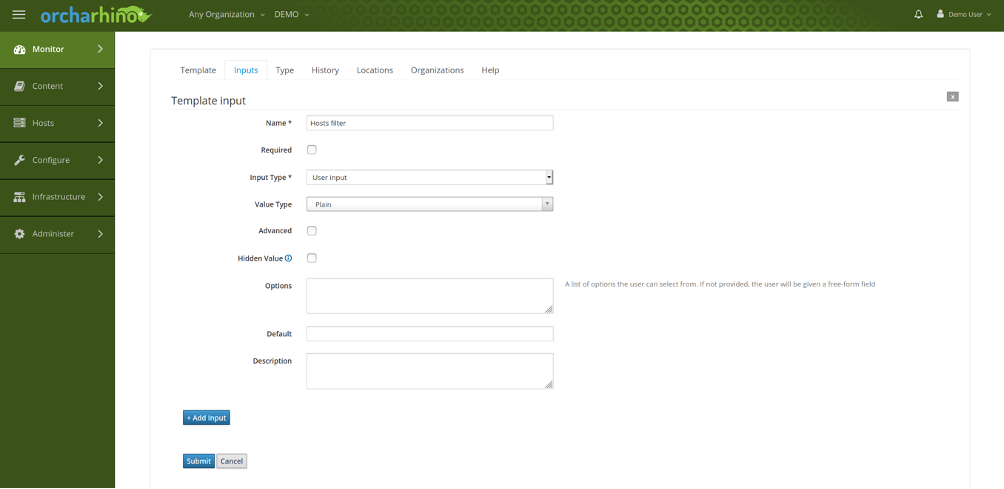
In typical ruby-style the ‘each_record do |host|’ in line 14 iterates over all returned hosts entries. The complete host information is dumped in ‘host’ omitting all Windows hosts in line 15. The host attribute “host.content_facet_attributes.errata_counts[:type]“ contains the exact number of installable errata of the kind “type”. We distinguish between security, bugfix and enhancement errata. All collected data is then processed via ‘report_row()’ in line 16. This macro adds a host line to the report table, which we then render via „<%= report_render -%>“ at the end of the template.
After defining the template, we now execute it by hitting the “Generate” button right behind the template in the web GUI. We have to insert the execution time and date, the file format (csv, json, ymal, html) and mail forwarding, if desired. We leave the ‘Hosts Filter’ user input section empty in order to get a table entry for each registered Linux host and execute the template. The report looks like this:
| Host | OS | Environment | Security Errata | Bugfix Errata | Enhancement Errata | Total Errata |
| centos7.demo.atix | CentOS 7 | Development | 7 | 14 | 2 | 23 |
| oracle8.demo.atix | OracleLinux 8 | Testing | 16 | 31 | 2 | 49 |
| debian10.demo.atix | Debian 10 | Testing | 11 | 0 | 0 | 11 |
Every row of the table represents one host. For the host “centos7.demo.atix” we see, that seven of the 23 applicable errata are in fact security errata, a definite warning sign to patch the host as soon as possible. If we compare this number of security errata with the errata list returned by “Host – Applicable Errata”, we see, that the number of applicable errata is identical to the number of installable errata. We can therefore close all security vulnerabilities with a simple package update.
Summary and outlook
Report templates are an easy-to-use orcharhino tool to generate clear and simple reports. In the course of this blog, a report template was written to determine the number and kind of installable errata for each host. However, the area of application for report templates is not limited to this special case. Report templates allow access to functionalities of the foreman API and orcharhino intern variables. For further information, a look into the Foreman API, community templates, and the macro help list is recommended.