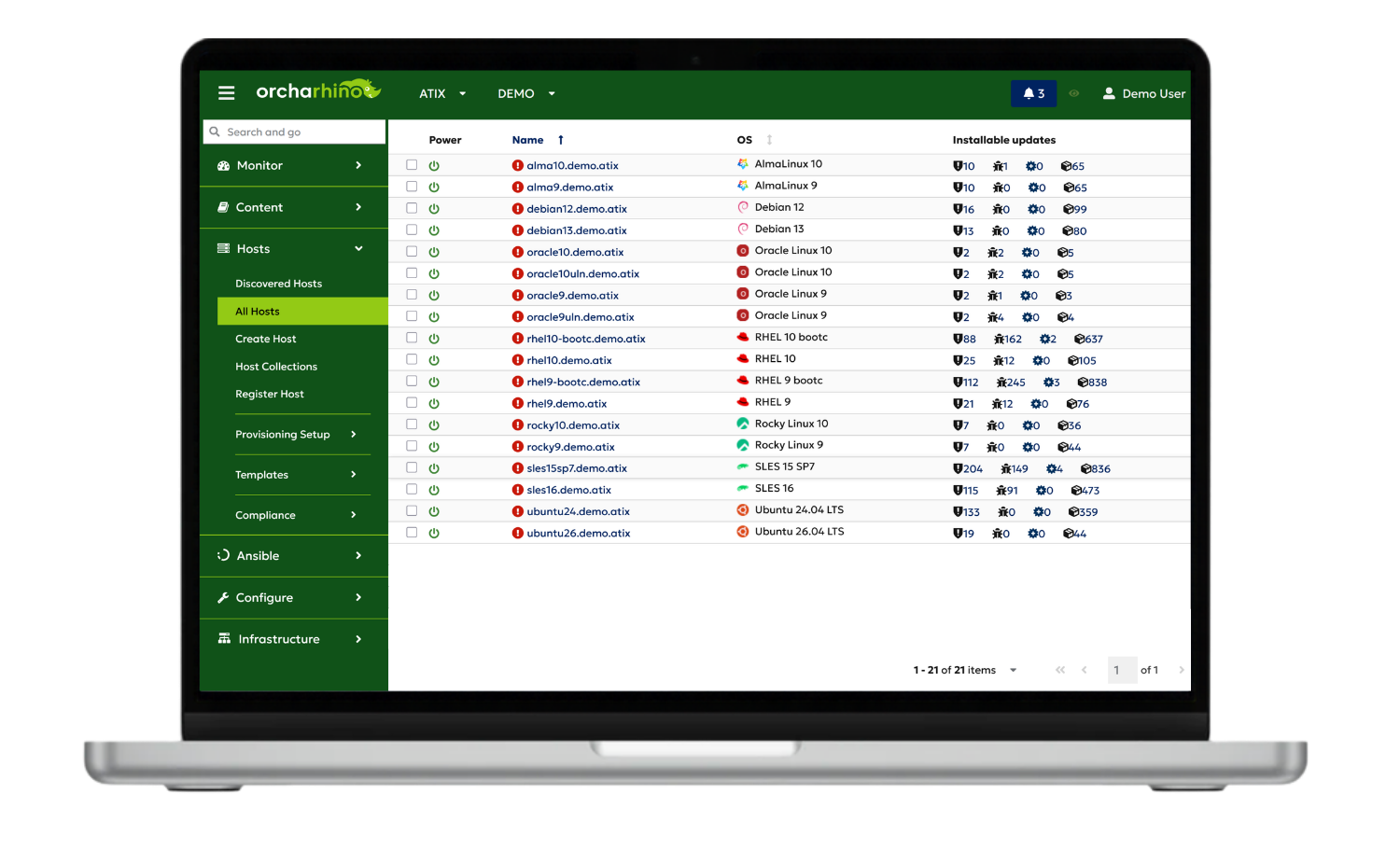
Linux Patch Management – controlled, reproducible, and automated

As Linux infrastructures grow, security vulnerabilities, maintenance windows, and compliance requirements need to remain manageable – without putting production operations at risk.

orcharhino is Patch Management software that helps IT teams and infrastructure managers keep heterogeneous Linux environments under control.

  • Manage patching processes centrally
  • Maintain reproducible software states
  • Roll out updates in a controlled manner

What is Linux Patch Management?

Linux Patch Management refers to the controlled process of deploying, testing, approving, and installing security updates, bug fixes and other software updates on Linux systems. In complex IT environments, professional Patch Management also includes centralised management of repositories, package versions, maintenance windows and patch status.

Why is traditional Patch Management reaching its limits?

With growing Linux infrastructures, the workload, complexity and security demands are increasing. Different software versions, manual processes and a growing need for coordination are making Patch Management increasingly time-consuming.

More systems

less transparency

  • Patch statuses must be continuously tracked and compared.
  • Routine tasks take up more and more time

Multiple distributions

increasing complexity

  • Repository and package versions are drifting apart
  • More effort required for review, testing, and coordination

Growing security pressure

greater urgency to act

  • Security vulnerabilities require a prompt response
  • Compliance audits require transparent patching and approval processes

Patch management therefore means far more than simply installing updates these days. It is about managing the entire lifecycle of software packages in a controlled manner.

How does Linux Patch Management work with orcharhino?

orcharhino provides end-to-end management of the patching process: repository content is centrally managed, versioned, tested, approved, and rolled out in a controlled manner. Patch status, errata, and CVEs remain centrally documented and traceable throughout the process.

Counter 1 Streamline Icon: https://streamlinehq.com

Repositories

Package contents are sourced and managed centrally from external repositories. 


The connected systems access content that has been made available in a controlled manner, rather than accessing external sources directly.

Counter 2 Streamline Icon: https://streamlinehq.com

Versioning

Defined repository states are stored as versions. 


This makes it possible to reproduce and track identical software states.

Counter 3 Streamline Icon: https://streamlinehq.com

Test & Staging

Updates are validated in test and staging environments before being deployed in production.

This enables errors and incompatibilities to be identified at an early stage.

Counter 4 Streamline Icon: https://streamlinehq.com

Approvals

New package statuses are specifically approved for defined systems.


Transparent approval processes ensure transparency and control.

Counter 5 Streamline Icon: https://streamlinehq.com

Rollout

Patches are rolled out automatically at specified times and within defined maintenance windows. 


This reduces the amount of manual work required during day-to-day operations.

Counter 6 Streamline Icon: https://streamlinehq.com

Documentation

Patch statuses, errata and CVEs are recorded and analysed centrally. 


This keeps software states traceable for audits, compliance requirements, and further actions.

This is what sets orcharhino apart from traditional patching solutions: it automates not only update installation, but the entire software package lifecycle in a controlled and reproducible way.

The benefits at a glance

Release Alert Streamline Icon: https://streamlinehq.com

Respond faster to CVEs

reduce risks to production systems
Sync Saved Locally Streamline Icon: https://streamlinehq.com

keep software states reproducible

Manage versioned patch, package, and repository states

Provide defined software states in a reproducible manner
Precision Manufacturing Streamline Icon: https://streamlinehq.com

reduce manual effort

Automate recurring patching processes
Reduce operational effort
Fact Check Streamline Icon: https://streamlinehq.com

strengthen transparency & compliance

document patch status and changes in a traceable manner
Help meet compliance requirements with auditable processes

Companies rely on orcharhino

See orcharhino in action

Learn in a personalized demo how to centrally manage repositories, software states, testing, approvals, and rollouts.

What should Linux Patch Management software cover?

Professional Linux Patch Management software should reliably roll out updates and provide a clear overview of patch status. It should highlight security updates and CVEs and provide defined software versions.
Controlled testing, approval, and rollout processes help ensure predictable operations.

What sets orcharhino apart from traditional Patch Management solutions

orcharhino combines Patch Management with other infrastructure management functions. The solution integrates repository and software version management with Provisioning Management, Configuration Management, Release Management, and Lifecycle Management. This enables systems, configurations, and updates to be managed centrally through end-to-end processes.

Aspect
Typical focus of traditional Patch Management solutions
orcharhino
Process scope
Execution of individual steps in the patching process
manages the entire patching process
Repository control
Use of available repository and package states
versions and controls repository states
Software states
Execution of patch jobs
provides reproducible software states
Packages and approvals
Execution and control of updates
enables centralized control over packages, versions, and approvals
Linux distributions
Distribution-specific patching processes
standardizes processes across numerous Linux distributions

Process scope

Traditional patch solutions
Execution of individual steps in the patching process
orcharhino
manages the entire patching process

Repository control

Traditional patch solutions
Use of available repository and package states
orcharhino
versions and controls repository states

Software states

Traditional patch solutions
Execution of patch jobs
orcharhino
provides reproducible software states

Packages and approvals

Traditional patch solutions Execution and control of updates
orcharhino
enables centralized control over packages, versions, and approvals

Linux distributions

Traditional patch solutions
Distribution-specific patching processes
orcharhino
standardizes processes across numerous Linux distributions

Which Linux distributions can be patched centrally?

With orcharhino, numerous Linux distributions can be centrally managed and patched, including Red Hat Enterprise Linux, Ubuntu, Debian, SUSE Linux Enterprise Server, AlmaLinux, Rocky Linux, Oracle Linux, Amazon Linux, and CentOS Stream.

The patching processes can be managed consistently across physical servers, virtual machines, and cloud environments.


Red Hat Enterprise Linux Logo
AlmaLinux Logo
Debian Logo
Rocky Linux Logo
suse
oracle linux
Ubuntu logo
Amazon Linux distribution logo

Which Linux distributions can be patched centrally?

With orcharhino, numerous Linux distributions can be centrally managed and patched.

The patching processes can be managed consistently across physical servers, virtual machines, and cloud environments.
Details on distributions and architectures

Learn more about the individual Linux distributions, their specific characteristics, and how they can be integrated and managed with orcharhino.

→ View Linux distributions in detail

Supported architectures: x86_64/AMD64 and, depending on distribution and Version, ARM64 and PPC.

A complete overview of supported distributions, versions, and architectures can be found in the datasheet.

→ View the latest datasheet

How to get started with orcharhino

Explore & test

  • Web-Demo: live orcharhino demo with our team
  • In A Box: test orcharhino in your personal test environment
  • Download: install and test orcharhino in your own environment

The implementation project

If orcharhino meets your requirements, we guide you through a structured implementation in your environment.

Counter 1 Streamline Icon: https://streamlinehq.com

In the architecture workshop, we define requirements and target architecture.

Counter 2 Streamline Icon: https://streamlinehq.com

We install orcharhino and configure it to match your environment.

Counter 3 Streamline Icon: https://streamlinehq.com

We integrate existing systems with orcharhino step by step.

Counter 4 Streamline Icon: https://streamlinehq.com

We move orcharhino into production in a controlled manner.

Linux Patch Management in practice

How companies automate patching processes and manage software states in a controlled manner

Companies across a range of industries use orcharhino to coordinate patch rollouts, manage repository states in a traceable manner, and reduce manual effort in day-to-day operations. Selected customer testimonials show how this approach delivers value in real-world environments.

“Patches are now installed in a coordinated and automated way. This saves valuable time while providing greater transparency.”

Marcel Knandel, Head of Compute and Runtime Service Linux
Schwarz IT KG

“Automation eliminates the errors that can occur with manual patching.”

Lukas Plattner, Security Management, Automation & IT Operations Optimization
APA-IT

“We can generate reports and freeze different versions … This saves us a considerable amount of time.”

Rainer Schilling, IT Infrastructure Specialist
Cordes & Graefe KG

“Repository management has clearly improved since we started using orcharhino.”

Stefan Bock, IT- Engineer
IT-Systemhaus der Bundesagentur für Arbeit

“For us, orcharhino was the logical next step – a solution that supports both Debian and Oracle Linux equally well.”

Onno Siebrecht, technical Responsible
WERTGARANTIE Group

Automation reduces the time spent on patching processes

> 60 %

less time spent on patching

on average across our customer projects

Based on our customer projects to date, the time spent on patching processes is reduced by more than 60% on average. Automation contributes to this
across the entire workflow – from repository management and versioning to testing,
approval, rollout, and documentation. The actual savings depend on the existing environment, system landscape, and level of automation.


Frequently asked questions about Linux Patch Management

orcharhino supports AlmaLinux, Amazon Linux, CentOS Stream, Debian, Oracle Linux, Red Hat Enterprise Linux, Rocky Linux, SUSE Linux Enterprise Server, and Ubuntu.
x86_64/AMD64 is supported for all listed operating systems; ARM64 and PPC are available depending on the distribution and version.

Further information on supported releases can be found in the orcharhino datasheet.

Yes. Systems do not need to have been newly installed or provisioned with orcharhino.

Existing supported Linux systems can be registered at a later stage and then managed centrally. For this purpose, orcharhino generates an individual registration command that is executed on the respective hosts.
Activation keys can be used to assign repository states and lifecycle environments, among other settings. The additional components required for Patch Management, Remote Execution, or Configuration Management depend on the desired scope of functionality.
orcharhino keeps repository states reproducible by storing defined content states as versioned snapshots. The repository itself is not versioned; instead, a defined state of its content is preserved.
Repositories are grouped into so-called Content Views. Filters can be used to determine which packages and errata are included or excluded. Publishing a Content View creates a versioned snapshot. Subsequent changes to the underlying repositories do not affect this already published state.

The respective Content View version can then be promoted in a controlled manner through lifecycle environments such as development, testing, and production. This ensures that production systems only gain access to a new software state once it has been tested and approved.

Previous versions are retained and can be made available again if required. This makes it possible to trace defined software states and provide them reproducibly.

Yes. Managed Linux systems do not require direct access to public networks, as they can obtain packages and updates through the orcharhino server or an orcharhino proxy.

Isolated environments are also supported. For example, content can be synchronized via an upstream orcharhino server, provided that an appropriate network connection exists within the organization.

In a fully air-gapped environment, content can be exported on a connected server, physically transferred, and then imported on the isolated server. The appropriate architecture depends on the respective network and security zones.

Patches can first be made available and tested in a separate test environment before they are approved for production systems.
orcharhino uses lifecycle environments such as development, testing, and production for this purpose. Content Views define which repository and package states are available in each environment.
After successful testing, the same Content View version can be promoted from the test environment to production. This means that production systems only gain access to the tested software state once it has been explicitly approved. Promoting a Content View to a lifecycle environment does not automatically install the packages on the hosts.
orcharhino provides a central view of security-related errata and helps identify affected systems and available security updates. Errata can be filtered for security-relevant updates. orcharhino distinguishes between updates that are generally relevant to a host and those that can actually be installed within its current Content View and lifecycle environment.
Security errata contain information about resolved vulnerabilities and can be classified by severity. Using the Hammer CLI, errata can also be searched specifically by CVE. Selected errata can then be made available and installed on the affected systems in a controlled manner.
Critical security updates can be added selectively to an existing repository state without updating the entire software state. Already synchronized errata that are relevant to the managed systems can be added through an incremental update. For example, an existing version 1.0 can become version 1.1.
This allows an urgent security patch to be added to a frozen software state while all other package versions remain unchanged. The incremental version can then be promoted to the required lifecycle environment and rolled out specifically to the affected systems.
Yes. Managed Linux systems do not require direct internet access, as they can obtain packages and updates through the orcharhino server or an orcharhino proxy.
Isolated environments can also be supported. If an internal network connection is available, content can be synchronized via an upstream orcharhino server. In fully air-gapped environments, content can be exported on a connected server, physically transferred, and then imported on the isolated server.
The appropriate architecture depends on the respective network and security zones.
orcharhino supports traceable patching and compliance processes through defined software states, centralized monitoring, and reporting.
Versioned Content Views and lifecycle environments make it possible to control which software states are made available for development, testing, and production.
For compliance assessments, orcharhino can use OpenSCAP. Compliance policies can be managed centrally, scans can be run regularly or on demand, and the results can be evaluated in compliance dashboards and detailed reports. This makes it possible to identify which systems comply with defined policies and which hosts require action.

orcharhino can be managed through its browser-based management interface, the Hammer CLI, and a REST API. This makes it possible to automate recurring tasks and integrate existing IT systems and portals.

orcharhino also supports integration with Ansible, OpenVox or Puppet, and Salt. Existing automation content can be integrated and reused depending on the tool in use, so established processes do not need to be rebuilt from scratch.
The most suitable integration approach depends on the existing automation and Configuration Management environment.

Bring control to your Linux Patch Management

Schedule a personalized demo and discover how to centrally manage patching processes, close security vulnerabilities faster, and provide reproducible software states.

More Core Capabilities of orcharhino

Patch Management is part of orcharhino’s comprehensive infrastructure management approach. Explore additional core capabilities for centrally managing and automating your IT infrastructure.

Provisioning Management

Standardize and automate system provisioning

Configuration Management

Manage configurations centrally and keep them consistent

Content
Management

Manage versioned repositories and software states

Security
Management

Identify vulnerabilities and monitor security status centrally

Compliance Management

Check policies and document compliance results

Search