
Managing Linux workstations across an organization requires far more than handing out pre-installed laptops. Modern IT organizations need an automated, predictable lifecycle strategy: automated provisioning, controlled software distribution, security compliance, and reliable update mechanisms. The main drivers to explore Linux-based alternatives to proprietary desktop operating systems are usually developer productivity and digital sovereignty.
On the one hand, engineering teams are transitioning to native Linux laptops (running operating systems such as Ubuntu) to eliminate the performance bottlenecks of virtual machines. On the other hand, European public administrations and security-conscious enterprises need sovereign, highly standardized open-source workplaces that prevent vendor lock-in and fulfill their security and compliance requirements.
One of approach to get an underlying operating system (OS), which is tamper-prrof and protected against accidental misconfiguration, is the usage of a containerized OS model using bootc (bootable containers). EUOS is an initiative, which built a proof of concept to showcase this idea including the whole orchestration and identity management.
Handing out a fresh laptop is easy. Keeping it secure, compliant, and working over the next three years is the part that usually gives IT teams headaches. Laptops travel between office networks, home Wi-Fi, and offline environments. They do not maintain static IP addresses, and they cater to fundamentally different operational use cases.
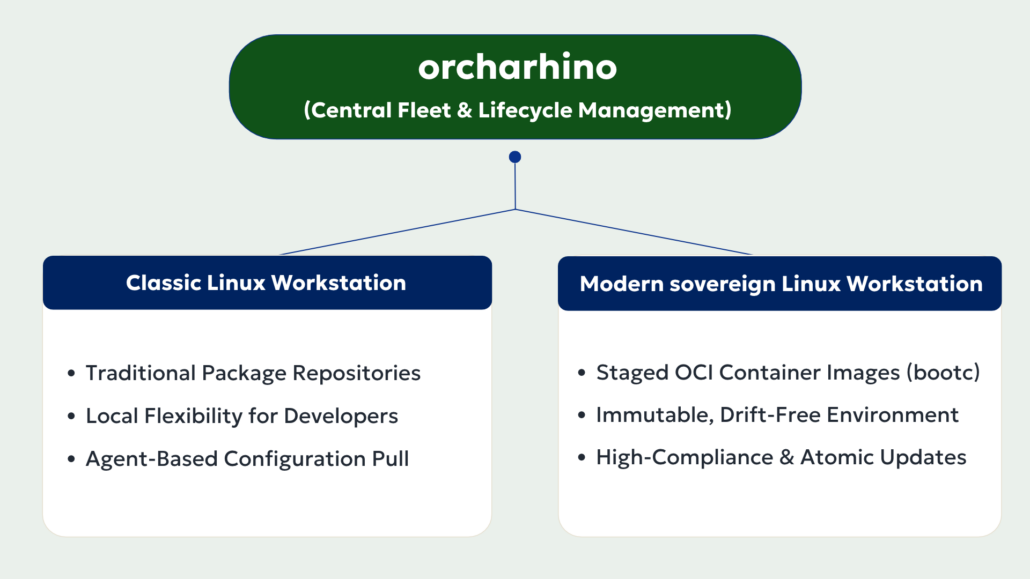
In practice, this comes down to two different approaches: the classic package-based model and the containerized OS model (bootc). Both can be managed centrally with orcharhino.
Two Paths to the Linux Desktop: Understanding the Differences
When planning a Linux workstation rollout, IT decision-makers can choose between two paths:
1. The Classic Model (e.g., Ubuntu Workstations)
This is the approach most IT professionals are familiar with. The operating system consists of thousands of individual building blocks (software packages).
- How it works: An automated installer sets up the base system. Over time, individual packages (like a web browser, a developer tool, or a security patch) are updated or added independently.
- Why teams use it: It offers maximum flexibility. Software developers and technical specialists can install tools, adjust settings, and tailor their working environments to their specific project needs.
- The challenge: Because every machine updates individual packages independently, systems can drift apart over time. A software update that works on Laptop A might cause dependency conflicts on Laptop B.
2. The containerized OS Model: bootc & Immutable Desktops (e.g., EUOS)
To solve the problem of configuration drift and ensure strict compliance, the Linux world has adopted a concept known from modern cloud architectures: bootable containers (bootc).
- What is bootc? In simple terms: Instead of installing hundreds of loose packages onto a laptop, the entire operating system including applications is packaged as a single, sealed “container image”. The technology behind this is called bootc
bootc(bootable containers). - Immutability (Read-Only Safety): The core operating system on the laptop is locked (immutable). Users and background processes cannot accidentally break system files.
- Atomic Updates: Updates are delivered as an entire image replacement rather than individual package patches. If an update fails, the machine automatically restarts into the previous, working state. There is zero risk of an unbootable machine midway through a patch cycle.
- Why it matters: For sovereign workplace for public administrations like the EUOS initiative, this approach solves an architectural problem. It ensures that hundreds or thousands of public administration laptops across different locations are 100% identical, hardened against tampering, and easily auditable.
Unified Fleet Management: Bridging Both Worlds
Both architectures require central management. Even if an organization needs both, supporting flexible Ubuntu machines for engineers and locked-down devices (with bootc) for administrative staff, there is no need to maintain two separate toolchains or accept doubled operational overhead.
With orcharhino, organizations manage classic developer workstations and next-generation sovereign desktops through a single, unified enterprise lifecycle platform.
The 3 Core Capabilities of Workstation Fleet Management with orcharhino
1. Automated Hardware Onboarding (Zero-Touch Provisioning)
Manually setting up laptops using USB sticks is time-consuming, error-prone, and unscalable.
orcharhino introduces Discovery-based provisioning:
- When a new laptop is connected to the network, it boots into a secure, minimal discovery environment.
- orcharhino automatically registers hardware details (serial number, MAC address, CPU, disk size).
- Based on predefined organizational rules, orcharhino triggers the rollout automatically:
- A developer laptop automatically receives its OS installation and disk encryption.
- An administrative workplace receives the standardized bootc image written directly to the drive.
In practice, IT staff simply unbox the laptop, connect it to the network, and walk away. Staging time drops from hours of manual setup to minutes of automated installation.
2. Controlled Software Supply Chain & Patch Management
Operating systems must not pull unvetted updates directly from the public internet. Doing so risks security breaches and unexpected downtime.
orcharhino acts as a secure firewall and distribution hub for software:
- Traditional systems: orcharhino synchronizes external package sources, such as Ubuntu repositories, with internal repositories. IT administrators can first test updates in a test environment and then release them for production laptops.
- For bootc Systems: orcharhino manages the underlying container registries. Operating system image releases are systematically promoted through lifecycle stages (Development → Testing → Production).
This gives IT leadership full auditability: you know exactly which patch level or OS image was deployed to any machine at any given time.
3. Mobile Device Reality: Managing Laptops on the Move
Laptops are not stationary servers in a data center. They move between corporate networks, home offices, and travel hotspots or frequently remaining offline for days.
Traditional push-based management tools often fail when devices are behind dynamic home routers. orcharhino solves this using an agent-based model:
- Whenever a laptop connects to the internet or corporate VPN, the local management agent checks in with orcharhino.
- The agent pulls down pending configuration changes, security baselines (such as CIS benchmarks or BSI standards), or triggers the download of the next verified bootc image layer in the background.
This ensures devices stay updated and compliant without requiring users to be in the office or on a physical corporate network.
Why This Matters: Starting Small, Scaling Without Limits
A common misconception is that enterprise management solutions are only justified for organizations with thousands of endpoints.
In reality, centralizing client management provides immediate business returns even for smaller fleets:
- Consistency from Day One: Solves the notorious “it works on my machine” problem among software developers.
- Rapid Disaster Recovery: If a laptop suffers physical hardware damage, a replacement device can be reprovisioned to the exact target state in a single automated step.
- Future-Proof Investment: Organizations can start today by automating standard Ubuntu laptops for their technical staff. As sovereign initiatives like EUOS mature, the exact same orcharhino infrastructure is ready to roll out next-generation, image-based client fleets with no need to replace the management backend.
Summary
Linux on the enterprise desktop is moving from a niche topic into production reality, driven by engineering teams demanding native performance and public sector organizations striving for digital sovereignty with initiatives like EUOS. Its success depends on operational automation.
By supporting both traditional package-based distributions and modern, containerized operating systems via bootc, orcharhino allows teams to run flexible developer machines alongside locked-down sovereign desktops without doubling their toolchain.
Planning to introduce Linux workstations or looking to modernize your endpoint lifecycle management? Contact our specialists or request a live demonstration of orcharhino.
