
Release Overview
Release Highlights
Performance enhancements
The orcharhino 7.10 release includes several performance improvements. Task cleanup during the orcharhino upgrade now uses multiple cores instead of a single core, speeding up this step of the process. Additionally, for remote execution jobs, an optimization results in faster UI performance for users with many organizations assigned. It is planned to improve the remote execution UI in a future release even more.
Proxmox Compute Resource: UEFI Secure Boot Support
In orcharhino 7.10, the Proxmox compute resource now supports creating virtual machines with UEFI Secure Boot enabled, providing the possibility to provision operating systems that require Secure Boot. This improves platform security by ensuring that only trusted, signed boot components are loaded during system startup.
Enriched Audit Logs with User Login Details
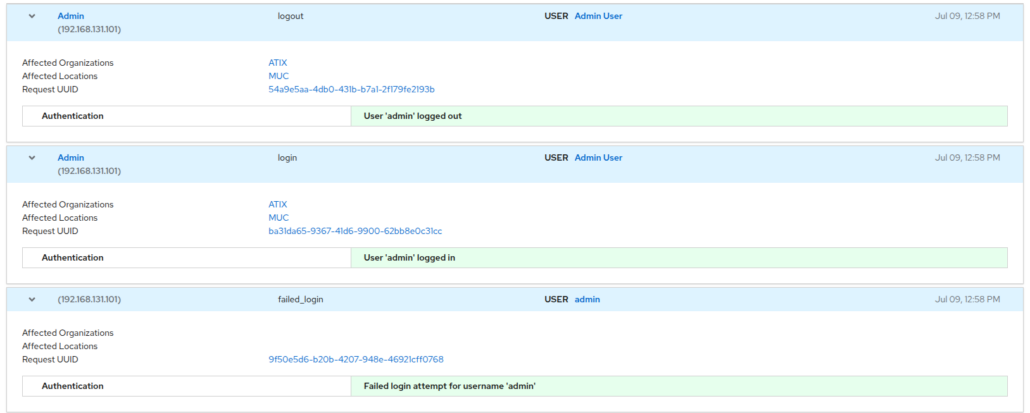
Building on previous updates that allowed audit logs to be exported as a separate file to central logging tools (see knowledge base article), orcharhino 7.10 now enriches audited events with additional information about user logins, logouts and failed login attempts.
Continuous Documentation Improvements & Expansion
As orcharhino evolves, our documentation is continuously updated, expanded, and refined with user feedback in every release. Beyond structural updates to several chapters, this release adds helpful tips for daily tasks. For example, did you know that you can directly connect your hosts with host collections via the activation key? The documentation now hints this feature at the corresponding parts. If you use host collections to group systems for updates or even distribution upgrades, you can directly assign them to a collection during the registration process.
Tech Preview: Ansible Director Host Assignments
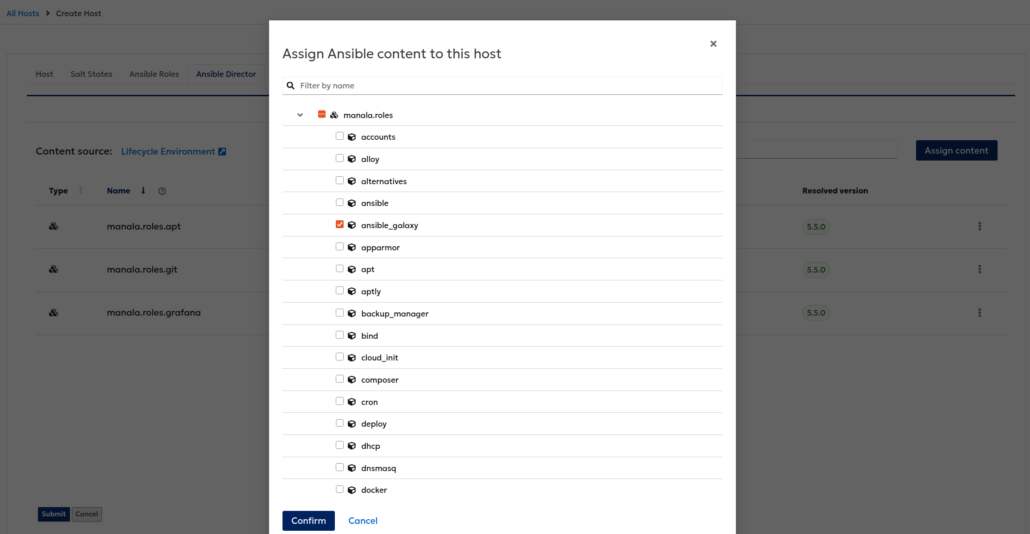
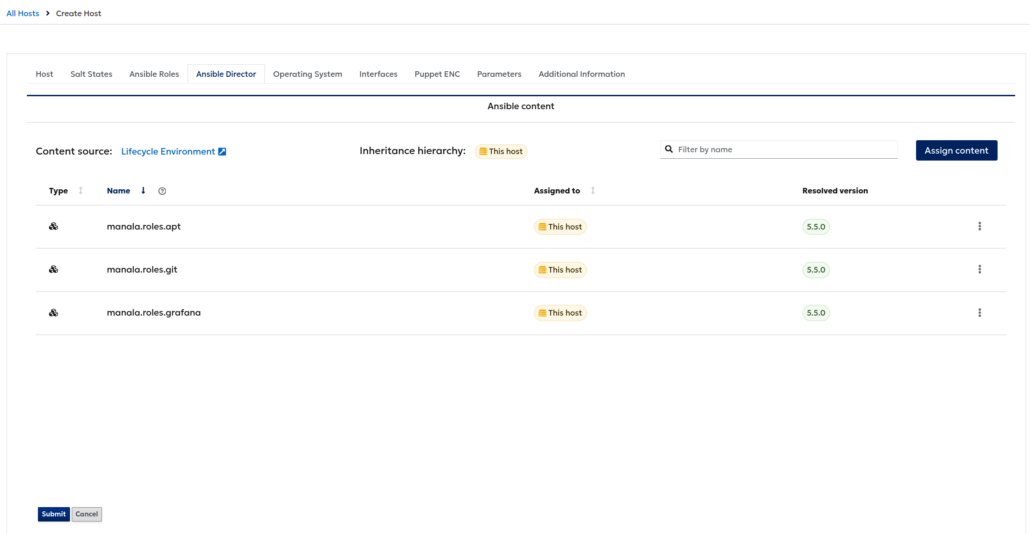
While still in Tech Preview, Ansible Director has gained important new automation capabilities in orcharhino 7.10. You can now assign Ansible roles directly to hosts or through host groups, and newly provisioned hosts schedule automatically an initial Ansible run. This ensures that systems receive their intended configuration immediately after the operating system is installed, reducing manual steps and making provisioning more consistent and reliable.
Changelog Features
- Clients (AlmaLinux, RHEL, Rocky Linux): Clients do not contain duplicate and potentially incompatible dependencies anymore that are available in BaseOS or AppStream.
- Content Management (Debian): Fixed GPG key fingerprint of Debian 11 default OS repositories. If you experience synchronization issues, update the content credential that you have assigned to the Debian 11 repositories in orcharhino: https://docs.orcharhino.com/or/docs/sources/guides/debian/managing_content/adding_content.html#gpg-public-keys-for-debian
- Flatpak: The documentation to import Flatpak content and install Flatpak applications on hosts is now split between the Managing Content guide and Managing Hosts guide: https://docs.orcharhino.com/or/docs/sources/landing_page.html?page=managing_content/managing_flatpak_repositories.html and https://docs.orcharhino.com/or/docs/sources/landing_page.html?page=managing_hosts/installing_flatpak_applications_on_hosts.html
- Host Collections: Documentation added how to assign host collections to activation keys. With this, host collections are configured automatically when provisioning or registering new hosts. https://docs.orcharhino.com/or/docs/sources/guides/debian/managing_content/managing_activation_keys.html#creating-an-activation-key-by-using-web-ui
- Host Provisioning (RHEL): There is a new host parameter ‘use-redhat-register-snippet’ for RHEL 9 and RHEL 10 hosts. If set to ‘true’, the ‘redhat_register’ snippet is used instead of the ‘kickstart_rhsm’ snippet during host provisioning: https://docs.orcharhino.com/or/docs/sources/guides/red_hat_enterprise_linux/provisioning_hosts/using_network_boot_to_provision_hosts.html#creating-hosts-with-pxe-boot-provisioning-by-using-web-ui
- Maintenance: The task cleanup procedure that runs during an orcharhino upgrade now uses `pbzip2` instead of `bzip2` to compress CSV files containing old tasks and dynflow actions. On multi-core systems, `pbzip2` compresses the data in parallel across multiple CPU cores, significantly reducing compression time and speeding up the cleanup process.
- Management UI: User login, logout and failed login attempts are now part of the audit log and shown on the ‘Audits’ page.
- orcharhino Offline ISO: You can now install and run orcharhino on Oracle Linux 9.8 by using ISO images.
- Provisioning Hosts (Cloud-Init): Adjusted documentation to reference the “Cloud-Init orcharhino” template for Debian, SUSE Linux Enterprise Server, and Ubuntu Clients: https://docs.orcharhino.com/or/docs/sources/guides/ubuntu/provisioning_hosts/vmware.html#associating-the-userdata-and-cloud-init-templates-with-the-operating-system
- Proxmox: Added support for nested pools.
- Proxmox: Added UEFI Secure Boot as a new firmware option: https://docs.orcharhino.com/or/docs/sources/compute_resources/proxmox.html#creating-hosts-on-proxmox-by-using-web-ui
- Remote Execution: The documentation now covers advanced REX settings about ‘Proxy batch triggering’: https://docs.orcharhino.com/or/docs/sources/landing_page.html?page=managing_hosts/remote_jobs.html#advanced-settings-in-the-job-wizard_managing-hosts
- Remote Execution: When a user belongs to many organizations, authorization performed 1+N SQL queries per taxonomy type to resolve subtree IDs. This behavior was changed to improve the performance.
- Compute Resources (KVM/libvirt): New documentation to delete VMs on KVM/libvirt: https://docs.orcharhino.com/or/docs/sources/compute_resources/kvm.html#deleting-a-virtual-machine-on-kvm
- Managing Content: Split documentation to import content into https://docs.orcharhino.com/or/docs/sources/landing_page.html?page=managing_content/adding_content.html and https://docs.orcharhino.com/or/docs/sources/landing_page.html?page=managing_content/synchronizing_content.html
- Managing Content: Combined chapters to manage content views and content view environments: https://docs.orcharhino.com/or/docs/sources/landing_page.html?page=managing_content/managing_content_views_and_content_view_environments.html
- Managing Content: New chapter to describe how to make errata available through content views: https://docs.orcharhino.com/or/docs/sources/landing_page.html?page=managing_content/making_errata_available_through_content_views.html
- Managing Content: New chapter about optimizing content storage and synchronization to bundle download and mirroring policies: https://docs.orcharhino.com/or/docs/sources/landing_page.html?page=managing_content/optimizing_content_synchronization_and_storage.html
Changelog CVE
- CVE-2026-12515: Content-upload might have leaked information on other products.
- CVE-2026-5135: Unauthorized modification of host configurations via broken access control.
- CVE-2026-5136: Privilege escalation to administrator-level access via usergroup role assignment manipulation.
- CVE-2026-5138: Information disclosure via improper validation of nested request parameters.
- CVE-2026-5142: Cross-tenant private ssh key disclosure via taxonomy scoping bypass.
Changelog Bugfixes
- Content (Containers): orcharhino gave a response ‘415 Unsupported Media Type’ instead of ‘404’ on oauth2 request against registry end point.
- Content Management (Debian/Ubuntu): Changes in package metadata were not considered for package upgrades.
- Content Management (Debian/Ubuntu): Publications with filters or incremental content view updates failed with ‘sending query and params failed: number of parameters must be between 0 and 65535’.
- Content Management: Incremental content views updates for rolling CVs crashed with undefined method ‘version_href’.
- Host Deployment (Ubuntu 24/26): Network deployment on UEFI was broken due to local disk boot.
- Host Provisioning (Debian/Ubuntu): A single package upgrade triggered the update of all packages of the system.
- Host Provisioning (Secure Boot): The documentation did not show modules to configure orcharhino Proxies to provision Secure Boot-enabled hosts for CentOS, Oracle Linux, and SUSE Linux Enterprise Server: https://docs.orcharhino.com/or/docs/sources/landing_page.html?page=provisioning_hosts/using_network_boot_to_provision_hosts.html
- Host Provisioning (Ubuntu): The REX configuration for remote execution was throwing an error when a non-root user was used for the SSH connection via “sudo-rs”.
- Installation: katello-certs-check crashed when used with wildcards certificates.
- Maintenance (SLES): Updated the Knowledge Base article how to use the SLES Service Pack Job to re-assign the host collection https://atixservice.zendesk.com/hc/en-001/articles/29848147059740
- OpenSCAP: The client installation on SUSE Linux Enterprise Server 16.0 failed due to missing cron package dependency.
- Proxmox: Boot order for image based deployment was not updated correctly to use image template disks.
- Proxmox: Prevented image template disks from being overwritten by conflicting compute profile disks during provisioning.
- Red Hat Insights: The periodic ‘Upload Inventory Task’ never finished if no connection to Red Hat Insights is configured.
- Remote Execution: Registering a SLES15SP7 host using a custom SSH user for remote execution failed.
- SCC Manager: An HTTP-Proxy that requires authentication did not work with SCC product synchronization.
Deprecations & Removals
- Content Management (Debian/Ubuntu): Phased-Update-Percentage package metadata is blocked and no longer synced from upstream.
- Maintenance: The upload functionality integrated in sos-report has been removed. To provide logs to the support, follow https://docs.orcharhino.com/or/docs/sources/support.html#providing-sos-report-to-support
Tech Previews
- Ansible Director: Creating and assigning content in different organizations via UI is now possible.
- Ansible Director: Facts collected during Ansible runs are now being sent to orcharhino.
- Ansible Director: Non-admin users could not manage Ansible variables.
- Ansible Director: orcharhino now automatically executes Ansible after the deployment of a host.
- Ansible Director: Reports of Ansible runs are now being automatically generated.
- OpenTofu: Ensured resources created via OpenTofu are removed if host creation fails.
- OpenTofu: TfState information is filtered out in log files.
